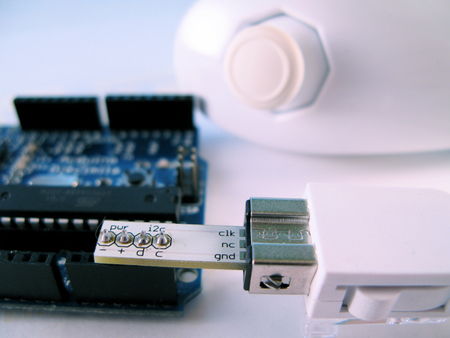
Want to hook up a Wii Nunchuck to an Arduino but don’t want to cut up the cord on your Nunchuck? Yeah me too. So I made some of these:
wiichuck_adapter1.jpg

wiichuck_adapter2.jpg

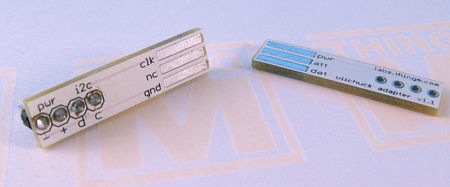
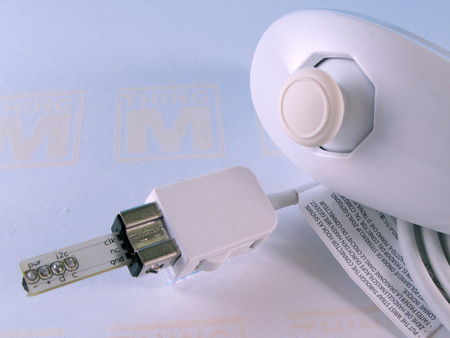
It’s a small PCB that adapts the Wii Nunchuck connector to standard 4-pin header. I call it the “wiichuck adapter”. It plugs directly into the Arduino, no wiring necessary. You can get one too for $4.

Available from the following wonderful shops:
- FunGizmos.com. International shipping for $1 more.
- Tinker.it (UK)
- Little Bird Electronics (Australia)

One of the coolest things about the Wii (to me) is that the expansion port on the bottom of the Wii remote is an I2C serial connection. This means that anything that plugs into that port can work with microcontrollers like the Arduino or Basic Stamp or others. Of the available peripherals, the Wii Nunchuck is one of the best. It contains a 3-axis accelerometer, a 2-axis joystick, and two buttons. Hooking up a Wii Nunchuck to Arduino is easy and I have class notes describing how to do it. But cutting off the connector of the Nunchuck to get at the wires is a little drastic.

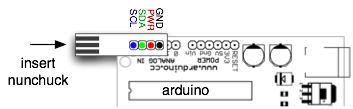
This “wiichuck adapter” let’s you play with the Wii Nunchuck and other Wii remote peripherals without needing you to cut cables. Just plug it into the Wii Nunchuck, then into the Arduino, in to Analog In pins 2,3,4,5. Pins 4&5 are the I2C communication pins and Pins 2&3 can act as the power supply for the Nunchuck.
wiichuck-diag.png

This is what it looks like plugged into the Nunchuck by itself.
wiichuck_adapter3.jpg

Nunchuck and Other I2C Devices (like BlinkM)

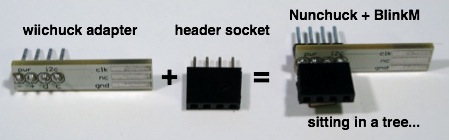
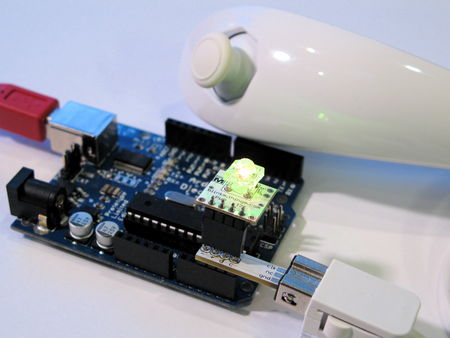
You can use other I2C devices at the same time as the Nunchuck. The I2C bus allows for multiple devices. For instance, if you have a BlinkM and also want to use a Nunchuck, no problem. The pinout of the BlinkM and the wiichuck adpater are the same. Just solder a little 4-pin socket header to the top of the wiichuck adapter.
wiichuck-header.jpg

And then you can plug in a BlinkM right on top.
wiichuck-blinkm.jpg

Software

To make it a little easier to play with the Nunchuck, I made a little Nunchuck library for Arduino and demo:
- nunchuck_funcs.h
- WiichuckDemo
(Wiichuckdemo.zip all zipped up)

It is based off the original research done by Chad Philips of Windmeadow Labs. The library uses the Wiring I2C library called “Wire”. This library is built-in to Arduino, as long as you have the latest Arduino development environment (0010 currently). To see another Arduino sketch using this library, you can check out the BlinkMChuck example that’s part of the BlinkM examples.

The library functions are:
- nunchuck_init() — init a nunchuck connected to an Arduino
- nunchuck_init_with_power() — init a nunchuck plugged directly into an Arduino on analog pins 2,3,4,5.
- nunchuck_get_data() — get a data packet from the Nunchuck

Then you can get at the data packet using various helper functions like:
- nunchuck_accelx() — get X-axis acceleration
- nunchuck_zbutton() — get Z-button state
- …and so on, see the header file for a complete list

Nunchuck Information

- Wiimote/Extension Controllers/Nunchuk — info page about the Nunchuck on WiiLi (Linux for Wii) site
- “Wiimote Accessory Bus” — docs about the Nunchuck’s connector.

Getting One / How to Order

Available from the following wonderful shops:
- FunGizmos.com. International shipping for $1 more.
- Tinker.it (UK)
- Little Bird Electronics (Australia)

Update 20 Feb 2008: Over 200 wiichuck adapters sold to more than 50 people in 5 countries. I still have some available if anyone wants one. To those who ordered up to now, you’ll be getting them in the post in a few days.
Update 29 Feb 2008: Over 300 wiichuck adapters sold and I still have many more left. Get yours if you want one. :-) Anyone that’s ordered before today should receive their adapters via first class post soon. I’ll be unable to mail out any orders for the first week of March.
Update 24 Mar 2008: I still have several left. If you’re in AU, you can also get the adapter kit from Little Bird Electronics.
Update 11 Apr 2008: Updated the nunchuck_funcs.h library to easily work with a nunchuck plugged directly into an Arduino by adding a nunchuck_init_with_power() function (see comments below). Also, I still have several adapter kits for sale.
Update 6 May 2008: All Out! But I’ll be doing another board run in a few days and will update here when I have more available.
Update 8 Jun 2008: FunGizmos.com is now carrying Wiichuck adapters! They also have lots of other cool things, like BlinkMs. :-)
Update 7 Jan 2009: Both FunGizmos.com (US) and Tinker.It(UK) carry the Wiichuck adapter.
Update 31 Mar 2009: Fixed small bug that made it not compile under more recent Arduino, and fixed links. Also: if you’re having problems getting this to work, in the Arduino software, go to the “Boards” menu, switch to a different Arduino board type, compile, then switch back to your type. This forces a recompile of the Arduino I2C/TWI library that sometimes doesn’t get compiled correctly.

123 Responses to ““WiiChuck” Wii Nunchuck Adapter Available”

Hey I did the same thing except I used a Dremel to etch stripes onto double-sided copper clad board.

http://www.societyofrobots.com/robotforum/index.php?topic=2633.0

[...] This “wiichuck adapter” let’s you play with the Wii Nunchuck and other Wii remote peripherals without needing you to cut cables. Just plug it into the Wii Nunchuck, then into the Arduino.“WiiChuck” Wii Nunchuck adapter available (for Arduino) - Link. [...]

How much for three boards shipped(US)? You can forget the 4 pin headers if it’d be cheaper.

Multiple boards (unless you’re buying >10) are just the single price multiplied. So 3 boards is $12. I do this just because most of the shipping cost to me is the time to package things up and get them sent out.

How do we order?

Hi Kerry. To order, send $4 via paypal to my paypal address listed above.

Uhh… what if we don’t have a paypal account? I still want one.

I believe paypal will let you pay with a credit card. Alternatively, you can mail me a check. Email me privately and I’ll set you up with a mailing address.

Hmm. Nice idea but it leaves me wondering about the voltage difference… The nunchuck is supposed to use 3.3V, not 5V as used and supplied by the Arduino board, right?

I used shapelock around one I made myself, it worked out to make a perfect connector, just like in the bottom of the wii remote.

All you have to do, is heat up some shapelock or friendly plastic and wrap it around this circuit board while the nunchuck is attached to it. Wait for it to harden and remove the nunchuck. It’ll be a perfect fit.

You are correct Henri. But it works fine. The chips used in the Nunchuck are 5V tolerant. Having said that, there’s no guarantee that Nintendo won’t change things and future Nunchucks won’t work with this.

And Joe, that’s a great idea. Shapelock is so awesome.

I was thinking your board could use a little notch on it to help hold the shapelock, but It’ll probably hold just fine. Mine actually has some wires coming out of it, and the shapelock goes all the way around. I was really happy with how well the connector worked. I was freaking out a little bit about the 5V as well, but I guess what’s the worst thing that could happen? I’d have to go buy another nunchuck.

[...] my WiiChuck Adaptors today. Now I just need to buy a WiiChuck and figure out a neat project for an Arduino. I learned [...]

[...] todbot blog » Blog Archive » “WiiChuck” Wii Nunchuck Adapter Available (tags: arduino electronics hacks microcontroller wiimote toread) [...]

Hi,
That’s simple and amazing.

How much shipping two of them to Spain?

Hi glloret, It looks like I can ship them via normal airmail post, so add $1 for each kit.

Ok then, I want two of them.

Thanks for your quick answer.

[...] todbot blog » Blog Archive » “WiiChuck” Wii Nunchuck Adapter Available (tags: arduino electronics hacks microcontroller wiimote toread) [...]

[...] My Wiichuck adaptor arrived a couple of days ago, and I just hooked it up.  As my first project, I’ve written this, which uses the Wii nunchuck as a musical instrument. Freqin’ Wii Hook a speaker to the output pin (defined below, 13 by default), and hook the Wii adapter up to analog pins 2-5, preferably using the Wiichuck adapter. Tilt the wii from side to side to adjust the tone, and tilt forward and back to adjust  the octave.  Push the joystick forward and back to adjust the length of the note.  Push the Z button to play the note.    I’m trying to think of what else I could do with this.  There’s just not a lot of data out there that can use three dimensions of acceleration data and two dimensions of joystick data. [...]

[...] up a bit to start on it though. So I was pleasantly surprised when TodBot dropped the news he made a wiichuck interface board for the Arduino. I ordered 3 or 4 of [...]

I was having trouble with todbot’s example not properly doing pins 2&3 doing power and ground, but I found the missing parts in Laen’s Freqin Wii, thanks for that.

// This sets up analog pins 2 and 3 to provide power and ground.
byte pwrpin = PC3;
byte gndpin = PC2;
DDRC |= _BV(pwrpin) | _BV(gndpin);
PORTC &=~ _BV(gndpin);
PORTC |= _BV(pwrpin);
delay(100); // wait for things to stabilize

I think I might end up getting the wiimote for interfacing with puredata or any OSC or midi app. But the wiichuck is great for standalone projects.

Oh you’re right, C60. Apologies to anyone who’s used the nunchuck_funcs.h library and it didn’t work for you. I’ll update the library shortly.

Everything Ok!!!
Adaptor received and working.

Thanks Tod!

Hi there, I ordered two last week and haven’t heard back. Are they on their way?

thanks,
J

Hi Jay, Apologies. As I mention in the update above, I wasn’t able to deal with any orders the first week of March. I’ll mail out orders on Monday so you should get it Wednesday.

[...] “wiichuck adapter” let’s your Arduino play with the Wii Nunchuck and other Wii remote peripherals without needing [...]

Mr hi
I am a student in electronics, I prepare my graduation project study design and implementation of an electrocardiogram through the soundcard why I think a transmetre ECG signal by a bluetooth end of the bluetooth also receive and ‘injected by the end of a sound card to be treated at micro computer
For this I need help in the emission and reception of bluetooth.
While awaiting a response from you accept Mr saltutations my respectful.

I just put together the adapter you sent and tried it out. Thanks Tod! It works great and is very nicely made.

[...] plugs into the Wii Remote during gameplay. Since I have one of Tod Kurt’s awesome little WiiChuck adapters, connecting the Arduino and guitar didn’t require cutting off the guitar’s connector in [...]

Thanks, Tod. I don’t think I could have brought myself to sacrifice any of my Wii hardware.

These also work nicely with Wii Guitar Hero guitars. I adapted your Nunchuk library to work with them, which I posted here:

http://www.jleyrer.net/blog/?p=191

Would this work with the Classic controller?
The WiiLi site has a page on it:
http://www.wiili.org/index.php/Wiimote/Extension_Controllers/Classic_Controller

Just curious…

Evan

You can purchase the “WiiChuck” Wii Nunchuck Adapter from:

http://www.littlebirdelectronics.com/products/wiichuck-wii-nunchuck-adapter

Cheers,

Marcus :-)

Great idea, there are lots of people that want to play but don’t want to chop the ends of the cables. I am sure this will get some new ideas from concept to reality!

Hi Evan,

It will work with the Classic controller. The Classic will return a different data packet, so the “nunchuck” library won’t be that useful. I think it will still cause the Classic controller to return data, but I’ve not tried it out yet.

[...] some help from Tod E. Kurt, I got a Wii nunchuk to talk to my Arduino board. Here’s a diagram of the nunchuk pinouts to [...]

[...] a mouse. In this previous article we looked at the Nunchuck and an adaptor board I purchased from Todbot. I also mentioned making a mouse device using the Nunchuck using ideas from Bernard’s [...]

[...] micro controller dev platform I’ve seen. If you’ve got one, now you can hook up a Wii-Nunchuck to it. If you like smaller and cheaper, check out [ladyada]’s [...]

Hi Tod, I received my adapter and soldered it up last night, but couldn’t get any data coming to or from it. It looks like the code’s hanging at the Wire.endTransmission(); portion of the init code, once it hits that line, nothing happens. If I unplug the nunchuk, then the code will continue running. I’ve checked each of the pins on the adapter to make sure that I didn’t bork up the soldering, and they all have the proper continuity and such. Is there a good way to determine if I have a bad Arduino? I’ll be booting up wii sports for the first time in ages just to see if I fried the nunchuk somehow as well (I’m rather new at all of this Arduino stuff, so I’m not putting it past myself)

Thanks!

Just as an update, the nunchuk isn’t fried, so either I’m doing something wrong in the code, or my Arduino’s analog pins are bad…

So what I’ve come out with now is that the code I grabbed seems to match the wiring shown in class #4, and not plugging it straight into analog pins 2-5 (or else pins 2 and 3 on my arduino are fried…). Is this expected, or are those pins likely dead?

Either way, it’s really cool that it works at all! Thanks again for the chip :]

HI Jang-Soo,
So did you get the Arduino to talk to the Nunchuck? It’s unclear to me from your last comment. The adapter used in the “Bionic Arduino” class notes #4 is a previous attempt at a wiichuck adapter and has a really screwed up layout. (I need to update those notes to show the new adapter in use)

As to what the problem might be with just plugging the Nunchuck directly into Arduino, I’ve seen Arduinos with solder bridges across a few of the Analog pins. Look on the bottom of your Arduino to see if you have any solder bridges. You can fix them up with a tap of the soldering iron. I’ve also had one Arduino have a bad header jack so that wires and stuff plugged into it wouldn’t make contact. Both caused lots of frustration. :)

To test out either of those cases, get a multimeter, plug something into the pins in question, and check for continuity from the thing plugged in to the trace on the bottom of the Arduino. If there is continuity, good. Then check neighboring traces to see if there’s a short you can’t see.

On the software side, one problem I’ve seen is that sometimes the Arduino application doesn’t rebuild the I2C libraries correctly. To fix this, load up your sketch, Go to the “Board” menu and choose a different Arduino type, wait a bit, then go back to the “Board” menu and choose your correct board type. Then re-upload the sketch.

And finally, be sure you’re using the latest version of the Arduino application. It seemed that only around version 0010 did the “Wiring” and I2C functions start correctly.

Hi! Yeah, I did get it working, but it’s not entirely as I expected I’d be able to.

I don’t have access to my multimeter right now… I’ll check and let you know what I find. In terms of stuff that I did try before I saw the message, I made sure that all of the pins that interface with the nunchuk have connectivity to the male jumper pins, and that none of those were bridged. I’ll have to check back later, I guess.

What I did do to get it working for me was to put it into a breadboard, having the data and clock pins go to analog 4 and 5, respectively, and then the + and - pins I put to the 5V and ground pins, respectively. When I had the adapter plugged straight into pins 2-5, there wasn’t any voltage going across 2 and 3 (checked that with my multimeter, which is what got me to try the other layout).

I’ve just tried rebuilding the I2C libraries again using that process, and ended up getting a few warnings regarding twi.c referencing an obsolete header file (I’m using 0011, if that makes a difference). I changed the reference from avr/signal.h to avr/interrupt.h, but it still will freeze at that endTransmission line, and without a multimeter, I really can’t check whether there’s any voltage across 2 and 3.

In any case, this works for my purposes probably just as well, and I suppose as a bonus, I don’t take up two analog pins just for power.

Thanks!

Oh crap, that’s right I forgot to update the “nunchuck_funcs.h” library to set pins 2 & 3 to be power & ground. This problems is mentioned above in the comments but I was supposed to update the nunchuck library. I’ve now updated that file so you should download it again.

If you have a nunchuck plugged directly into the Arduino, use this function to initialize the Nunchuck:

  nunchuck_init_with_power(); 

instead of the normal nunchuck_init().

Sorry about that. :)

Oh and that failure mode you’ve seen is typical when the I2C device you’re trying to talk to doesn’t exist. More complicated I2C libraries let you query the I2C bus for a device before trying transact with it. The “Wire” library used in Arduino is meant for ease-of-use and assumes you’re running power to all your components. ;)

(I haven’t ordered an adapter yet; my cable end was already cut off when I found your site) I’ve got the wiichuck working with the libraries as described, but I’m having a problem when I try to plug other stuff into the digital pins. Specifically, I’m using http://www.arduino.cc/en/Tutorial/ShiftOut to connect pins 8, 12, and 11 to an 74HC595; when they’re connected (not sending any messages/pin sets to the 595) the 595 goes haywire (I’ve got LEDs attached to its outputs), I don’t see data from the Nunchuck, and the blinkm doesn’t do it’s thing.

I’m wondering if this might be a ground/power problem, since I’m using the analog 2+3 - and I don’t have pull-up resistors yet. (595 is getting power and ground from the Ard power and ground pins; Ard is getting power from USB)

Any suggestions?
(duplicate of arduino forum http://www.arduino.cc/cgi-bin/yabb2/YaBB.pl?num=1208140946 )

Hi justfred,
I responded in the arduino forum, but wanted to add a bit here. You shouldn’t need pull-up resistors when playing with the Nunchuck. The Arduino has built-in pull-up resistors that work for small I2C networks.

Have you gotten the ShiftOut tutorial to work, with nothing else plugged into the Arduino?

…and addressed the solution there as well, but…

I had the new nunchuck library, but still had nunchuck_init(); in my code; changed to nunchuck_init_with_power(); and it works fine.

Thanks!

For those experiencing the hang after Wire.endTransmission(): Make sure your Nunchuk isn’t hooked up to the adapter upside-side down.

[...] anyone interested in using the nunchuck with Arduino, there’s a nice adapter piece that allows for a much nicer interface with the [...]

Hi todbot,

Great blog, and great booth at Maker Faire. I just sent you $4 last night; got any left? Thanks!

I spotted this wireless Nunchuk adapter in an Australian shop recently and I immediately thought of the WiiChuk adapter. Seems like it would work just fine. Goes for about AU$28

http://www.futuretronics.com.au/nintendo/wii/FUT-7118/fut_7118.html

A quick bit of googling reveals that Nyko are selling something similar in the US for $20. Looks like Nyko are also going to do a wireless Nunchuk clone for about US$35

I ordered one while away at school.
It was here when i got home. Thanks!

joe

Hi Evil Paul, Funny you should mention that, as I recently picked up a Wii Cord-free to play with for that very purpose.

If it can be a general wireless I2C data channel, that will be very cool.

[...] to an Arduino. The finger is controlled with a Wii Nunchuck hooked up to one of Todbot’s WiiChuck Adapters. The tilt of the accelerometer in the Nunchuck moves the middle finger on the flier. It [...]

Hello Tod,
I ordered one a few months back, and it is perfect! I came back here to order another one, but it seems I’ve missed the last batch. Are you planning on making more?

Daniel

[...] Take a WiiChuck Adapter [...]

Hi Tod,
Any update on your new wiichuck board run? I am itching to experiment with my arduino and nunchuck but dont want to cut the nunchuck cable :-) I want to order 2 pieces, thanks

Hi,

Yup, I got a new run done, and you can get them at FunGizmos.com.

Hi, does anyone knows how to get the adapter in europe??
tinker.it ships only to UK, and fungizmos shipping to europe is 70$….

Hi,
If someone in the EU wants to make a bulk order, I can ship them to that person (with quantity discount and inexpensive shipping), and they could be the “distributor” for them. :)

Hi,

I don’t have the shipping for the adapters quite right in the store yet. The plan is to only charge an additional $1 for international adapter orders. Until I get it fixed go ahead and make an order and the shipping will be free! (Wii Adpaters Only)

Will

[...] ?????????????Wii Nunchuck????????????????Wii Nunchuck????????Arduino?Wii Nunchuck????? [...]

[...] todbot blog » Blog Archive » “WiiChuck” Wii Nunchuck Adapter Available “Want to hook up a Wii Nunchuck to an Arduino but don’t want to cut up the cord on your Nunchuck? Yeah me too. So I made some of these…” (tags: diy electronics physicalcomputing howto wishlist wii make arduino) [...]

can anyone make one of these for an ipod?

> can anyone make one of these for an ipod?

Like this? Not sure if this is what you’re looking for.

http://www.sparkfun.com/commerce/product_info.php?products_id=8295#

[...] my setup under windows : - Arduino using a WiiChuck adapter from todbot (thanks kurt ^^) and the WiiChuck library from Tim Hirzel - Data sent to Processing via serial [...]

[...] Erfinder: http://todbot.com/blog [...]

paypal is still accepted? can you ship it to mexico?

Hi Oscar,
As mentioned in the post, FunGizmos.com sells them. And they’ll ship to Mexico.

Hey Tod,
I’ve used this great adapter in both my electric canoe and espresso machine. It’s awesome. One thing I’ve noticed after extended use and in rough environments (a vibrating motorized boat or hot and steamy espresso machine) is that the connection can begin to gently fail. I assume from the combination of connector stress, maybe some tarnishing, and de-springing of the contacts. Since i2c connection loss appears to crash everything, even a momentary tickle is trouble! Picture me quickly shutting down a boat I just lost control of. Luckily, the solution is only a few tiny solder blobs away. I dabbed on small (< .5 mm) solder blobs on the contacts, and this seems to cure the trouble. On my first pass, I dabbed on a little too much, and just filed it down to where it doesn’t get difficult to plug in.

Anyways, a little tip for anyone with extended use apps.

Hi tod, i have some troubles with adding the nunchuck_funcs.h library, i just move the .h file into the arduino’s libraries folder. But i cant use it, some errors appear when i try to include in some other code. So, can i ask you for a ZIP folder with your nunchuck_funcs library from arduino’s libraries?? do i need .cpp and .o files too??

Hi Mau,
Are you using Arduino 0012? There have been some changes in Arduino 0012 that make it harder to use the nunchuck_funcs.h library (and other “libraries” contained in a .h file)

To get around this, either use Arduino 0011 (you can have both on your computer at the same time with no problem). The other way is to insert some code statements above the #include line, like this:

// beginning of sketch
int ledPin = 13;
#include "nunchuck_funcs.h"
// the rest of the code

I can not figure out how to solder the example at the top of the page for adding the female header to the wiichuck board. I’m pretty new to soldering. Both sets of header pins will not fit thru the hole. Am I just supposed to “do my best” or is there some sort of secret? Thanks.

Hi Christopher,
Yes, soldering the female header on top is tricky. And requires you have 4 hands. :) What I did was to hold the adapter in a helping hands tool. Then as I was holding the female header aligned to the top of the adapter, I used a soldering iron that had a bit of fresh solder on its tip to tack down one of the header pins. With that one pin tacked, the female header stayed in place, so the other three pins could be properly soldered. Finish it off by properly soldering the tacked pin.

You’re probably saying to yourself that the result sounds like a pretty mechanically flimsy result. And you’re right, it can be because it’s just solder holding it together. You can minimize this by pushing the female header pin in the hole a bit while the solder is liquid.

Hi Tod, the fix to get nunchuck_funcs.h to work correctly under Arduino 0012 is actually pretty simple.

Only one line needs to be modified:

#include
changes to
#include “WProgram.h”

This seems to work pretty well on my Diecimila, with no side-effects that I have found…

How long does it take for the wii adaptor to arrive after we ordered it?

I am trying to find a way to use a wiichuck for a mouse on windows xp. Is this adapter and the Arduino the right things to get? I have no previous experience modding or using something like the arduino. Thanks.

Hi Cody,
If you want the Wii nunchuck to be a true mouse for Windows XP, then you’ll probably want to connect it to a Wii remote and then connect that via Bluetooth to your PC. There are several programs and libraries out there that take the Wii remote data (including Nunchuck info) and turn it into system events. Do searches on Hackaday.com and Makezine.com or just search for “wii remote hacking” or similar.

But because I think Arduino is so awesome, I think you should also get an Arduino and play with the Wii nunchuck that way. :) The Arduino looks like a serial port to your PC, so any programming language on Windows can access it. (but you’d have to write the program on the PC to take data from the Arduino and do something with it)

[...] (here) - WiiChuck Adapter - Tod of todbot.com very kindly produced a small adapter to make plugging your nunchuck into a breadboard particularly easy. [...]

clever…is it possible to use 2 nunchucks on the i2c bus of the arduino? perhaps with the use of a multiplexer or some sort of switch for the DATA line? (since both nunchucks have the same address)

bd

Getting some problems using this in 012.

Code:

#include “nunchuck_funcs.h”

void setup()
{

nunchuck_init_with_power();

Serial.begin(9600);
}

void loop()
{

if (nunchuck_zbutton())
{
Serial.println(”Z”);
}

delay(500);
}

Errors:

Applications/arduino-0012/hardware/libraries/nunchuck_funcs/nunchuck_funcs.h: In function ‘void nunchuck_init()’:

/Applications/arduino-0012/hardware/libraries/nunchuck_funcs/nunchuck_funcs.h:22: error: ‘Wire’ was not declared in this scope

/Applications/arduino-0012/hardware/libraries/nunchuck_funcs/nunchuck_funcs.h: In function ‘void nunchuck_send_request()’:

/Applications/arduino-0012/hardware/libraries/nunchuck_funcs/nunchuck_funcs.h:51: error: ‘Wire’ was not declared in this scope

/Applications/arduino-0012/hardware/libraries/nunchuck_funcs/nunchuck_funcs.h: In function ‘int nunchuck_get_data()’:

/Applications/arduino-0012/hardware/libraries/nunchuck_funcs/nunchuck_funcs.h:69: error: ‘Wire’ was not declared in this scope

Any ideas?

Cheers

Hi Dave,
Yeah, Arduino 0012 changed how sketches are compiled, causing problems for the ones that have include files that contain code. Try adding a #include <WProgram.h> right before the #include "nunchuck_funcs.h"

And Brian, I think you’re right. If you want to read multiple nunchucks, it should be possible with a bit of extra hardware like a few transistors acting as switches. Read one, switch to the other, read it, switch back, etc.

How do I get the text of the code in the nunchuck_funcs.h link on your page built into an Arduino library?

Thanx

Hi, I’m not sure what you’re asking. You can just drop the nunchuck_funcs.h file in your sketch directory and use the functions like they were library functions.

Please keep in mind that some of us are just learning. I also need some basic instructions on what to do with the nunchuck_funcs.h file. I’m getting the following error with the following code:

error: stray ‘\’ in program In function ‘void setup()’:
In function ‘void loop()’:

void setup()
{

nunchuck_init_with_power();

Serial.begin(9600);
}

void loop()
{

if (nunchuck_zbutton())
{
Serial.println(”Z”);
}

delay(500);
}

If I do:

#include “WProgram.h”
#include “nunchuck_funcs.h”

I get this error instead:

hardware\libraries\nunchuck_funcs/nunchuck_funcs.h:13:18: error: Wire.h: No such file or directory

In function ‘void loop()’:

I have copies of that file in the hardware\libraries tree AND my sketch folder!

[...] to your computer’s serial port.  To learn more about how this communication works, see the author’s tutorials or the original [...]

I picked up a Nyko Kama wireless nunchuck, hoping to use it with the WiiChuck:

http://www.gamestop.com/Catalog/ProductDetails.aspx?product_id=68826

It doesn’t seem to be powering up. (It works OK with the Wii, and a regular nunchuck is working OK with my WiiChuck and Arduino.) Has anyone else tried one of these?

Sup?

I have NO HACKING EXPERIENCE WHATSOEVER…
just makin’ dat clear… Could this allow the Guitar Hero World Tour guitar to be used as a game controller? Cuz then I could ROCK on Frets on Fire!!!
http://fretsonfire.sourceforge.net/about/

Mr. Awesome

Hello Tod! I have the BlinkM nunchuck sketch set up with all the necesary library’s but it won’t compile in any version of arduino!The bar where compiling starts goes from blue to brown and nothing else.Thanks, Robbie

I’ve been having problems with the wireless adapters as well. Plug in a wired Wiichuck to the Arduino - nice clean signal, accurate responses. But insert the wireless link in between and it’s noisy as all get out - values jump all over the place without any movement or button presses. Both work fine with the Wii (Lego Batman). Think there is some subtle difference in the timing or the frequency? I’d experiment more if I had the time.

[...] micro controller dev platform I’ve seen. If you’ve got one, now you can hook up a Wii-Nunchuck to it. If you like smaller and cheaper, check out [ladyada]’s [...]

Where can you get a few of these? Littlebird are out of stock, Fun Gizmos only have one and I want 3, and Tinker.It wont ship to Australia.

Do I have to sell a kidney to get one?

Hey Tod

Any news on when you’ll be making or sending out new adapters? Can i get one from you personally? Everywhere else is sold out.

Thanks

FunGizmos.com has a huge amount in stock now.

I am trying to run Tod’s example and have hit a wall. I am getting the error:

28: error: nunchuck_funcs.h: No such file or directory In function ‘void setup():
In function ‘void loop()’:

I am new to all this and would appreciate any help that someone could offer.

Thanks.

Hi Jim,
That’s the error you get when you just have the .pde file in your sketch directory not both the .pde file and the “nunchuck_funcs.h” file. Try downloading the WiichuckDemo.zip bundle linked above, unzip it into a directory called “WiichuckDemo”, and open that up with the Arduino software. You should see both files open in the Arduino editor. Then you should be able to compile and upload it.

I’m both new and stupid. It works great after making your suggested changes. Thanks!

Hey don’t feel bad, having multiples files in one Arduino sketch is a fairly advanced techniques that trips a lot of people up. And I didn’t call attention to it as much as I should.

This is a neat bit of kit and a handy guide, but I have one quick question about the WiichuckDemo code. You’ve used a counter and condition to reduce the rate at which data is accessed. Is there any particular reason for doing this? I’m assuming it was just to reduce the amount of calls to Serial.print.

I’ve hooked up my nunchuk to a servo and with the condition in place it’s pretty jerky, but without it it’s reasonably smooth - both using the joystick and accelerometers. However with the latter the board seems to hang every so often so I was wondering whether the condition was important.

Sorry if this isn’t the best place to be asking the question.

Hi blindfish,
This is a fine place to ask that question. The answer to why is there a delay() in there is mostly to reduce calls to Serial.print() but also because I think I had some issues with it hanging too.

The code we all use to talk to the Nunchuck is a reverse-engineering of the protocol it speaks, and we’re not quite sure if it’s fully correct. That and we’re driving the Nunchuck at 5V instead of its designed 3.3V. And we’re not using proper pullup resistors on the SDA & SCL lines. And then there’s the possibility that the Arduino Wire I2C library might have a few bugs in it when used with the Nunchuck. I’m kind of surprised it works at all. ;)

If you have two 4.7k resistors available, try wiring up a breadboard where you have one resistor going from the SDA pin (aka “d” on the wiichuck adpater) going to 5V and another resistor going from the SCL pin (aka “c”) to 5V. This adds proper pullup resistors to the little I2C bus between the Arduino and the Nunchuck, and should allow you to run it faster. Or it might blow out your Nunchuck. (again, smiley face :)

[...] found this info at TodBots site.  He made a Nunchuck adapter, which easily connects to the [...]

Mine was not working until I changes the serial port from whatever it was to 9600.

Serial.begin(9600);

Just thought I’d share in case someone else has the same problem. It might have something to do with the new Arduino software.

Anyhooo…
Thanks Todd.
Great little hack.

Hey Todd,

Is there a way to get readings from the joystiq part of the wiichuck?

Yup, the “nunchuck_funcs.h” library above has the functions nunchuck_joyx() and nunchuck_joyy().

Hi

I’ve adapted your code - using some code from ‘Making things talk’ as a reference, and some additional bodging in Python - and completed my first proper Arduino project: using the Wii-nunchuck for mouse input (I’ve added a link to a description as my ‘website’). I opted for a ‘call and response’ approach to handling data-flow and that seems to work fairly well… in fact I was able to remove the delay and counter from your code as it no longer seemed necessary. Tom Igoe suggests that whilst this approach may seem slower it should actually be more efficient. I haven’t put this to the test: I’m just happy that it works at all :)

Thanks again for providing this really helpful resource!

Just started playing around with my wiichuck. I’m amazed by the accuracy of this device. I’m collecting about 800 samples every 2.5 seconds and only seeing a difference of between 1-3 between the min and max values, when the nunchuck is stationary!

I’m interested in equating the 8 bit value to a G force. Based on http://www.wiili.org/index.php/Wiimote/Extension_Controllers/Nunchuk it seems that difference of 1G equates to about 53. For example:

x axis Min(at -1G):0×48 (72) / Medium(at 0G):0×7D (125) / Max(at 1G):0xB0 (176)

So given this scale is it safe to assume that -2G is around
19, and +2G is around 129? Even though this is supposedly a 2G accelerometer, I can easily get values of 0 and 255 by shaking the nunchuck, which I will assume to be inaccurate past 2G.

I’m interested in building a device using the nunchuck to record and transmit the g-forces as I drive my car around a track.

Thanks for sharing your work on this.

oops typo.. +2G should be around 229, not 129

Hi,

I uploaded your code on the arduino, unfortunately, the values sent by my nunchuck never change even when i move a lot, the nunchuck.

WiiChuckDemo ready
accx: 0 accy: 0 zbut: 1 cbut: 1

Any ideas on what’s wrong ?

Thanks any advance for your help.
Johnny Baillargeaux (from france)

Hi Johnny,
How is the Nunchuck wired up to the Arduino? Also, make sure you’ve got the latest version of the Arduino software (0016 is latest right now), and try the “Boards” menu thing described above under the “Update 31 Mar 2009″

Hi,

Thx for your quick reply. Yes i am using 0016 and also tried to switch and compile for an other board and go back + compile to the arduino board Duemilanove but without more success unfortunately.

The strange thing is that everything looks fine. I can see because of the diodes, that the code is downloaded to the board. I am a bit disapointed because i’ve created an other program with processing in order ot interact with the nunchuck but because this the arduino code doesn’t work as it should be, i cannot continue my project.

Otherwise, the nunchuck is connected to the arduino via the small adapter on the nunchuck + a socket between the nunchuck and the board. looks similar to your pictures above.

Thanks again for your help
Johnny Baillargeaux (from france)

Hmmm. Not sure what’s going on. Make sure the nunchuck is plugged in to the adapter exactly as in the pictures above: the “divot” of the metal part of the nunchuck connector is on the same side as the “pwr” & “i2c” labels on the adapter.

Then, make sure the adapter is plugged into Analog In pins 2,3,4,5.

Then, make sure you’re using the WiichuckDemo code above (which I think you are from your previous comment, but this is for others who may be reading this)

And just to be sure, this is a regular nunchuck from Nintendo, correct? We’ve not been able to get wireless nunchucks working yet.

Tod- FWIW, I’m having exactly the same experience as Johnny. I’m using a Duemilanove with ATMega328, Arduino 0016, WiichuckDemo code, toggled the Board selection as per the 3/31 update, tried both plugging into the 2/3/4/5 pins as well as plugging it into a breadboard configured in the manner of Jang-Soo above. Regular Nintendo Nunchuck known to be functional and plugged into the adapter correctly, no solder bridging on the adapter or the Arduino. - cheers and TIA, BPA

Hmm, that’s really weird. Is this a recently purchased Nunchuck? Maybe Nintendo changed how the Nunchuck works a little and it screws up our hacks.

Tod- The nunchuck was purchased last August, I believe. I know the analog pins 4 and 5 are functional because I can drive a BlinkM using them. The only thing I can think of at the moment is if I could have done something wrong in soldering the pins to the adapter, but it looks clean to me. I’ll continue investigating on my end to see if I messed something up. - BPA

Hi Bradley,
I just verified the WiichuckDemo still works for me, using a Nunchuck purchased about a year ago, a Arduino Diecimila with an ATmega168, and Arduino 0016 on Mac OS X.

I would recheck your solder connections, with a multimeter if you have one. If you’d like to take a few pictures of your adapter (both sides) and your Arduino (top & bottom) and post a link to them here, I’d be glad to look at it and see if I can see anything wrong.

Also, if you have a potentiometer or other analog sensor, you could try loading up the AnalogInput example, and try each of the analog pins 2,3,4,5 to verify they still work as inputs. This will let you know if those four pins are still working on your Arduino.

Can you use it with the barebones board??

Hi Chandler,
Yup, but it won’t just plug in, like on the Arduino, because of how the BareBones Board deviates from the standard Arduino pin layout. You would wire it up like a BlinkM, which is shown here:
http://www.flickr.com/photos/todbot/3461898602/

ok cool thanks. i think im going to buy one.

Todd- My abject apologies; as I started taking macro pictures of the adapter per your request I could see that one of the solder beads was not quite making contact. I resoldered the pin and all is working as expected. - thanks again, BPA

Yay, glad things are working. Cold solder joints occasionally bite me still too. Getting a loupe or other magnifier can make it easier to inspect the joints.

Something to say?