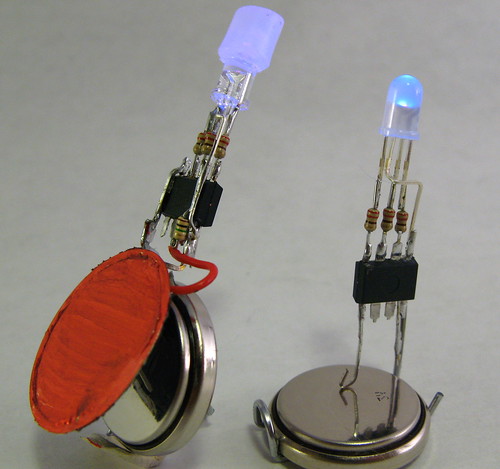
LEDs should be smarter. Sure we have flashing LED assemblies and even rudimentary RGB-flashing discrete LEDs. But LEDs themselves are predominately just dumb lights. There’s no real reason for this. Fab processes for microcontrollers and LEDs aren’t that dissimilar. It should be possible to have both in a single LED-like package.

There is a glimmer of this happening, like the “RGB LED Slow Colour Change” LEDs you can get. You can see an example of these being used on the Embarrasingly Easy CaseMod. Unfortunately you can’t change the cycle time or anything else of how these LEDs work. So let’s make our own. These prototype Smart LEDs will necessarily be larger than a production run, but the size is getting close, giving us a feeling for how we might use them.

Smart LED Designs

Making a Smart LED just means adding a micrcontroller to an existing LED. Alex Weber created a neat version of this with his Programmable LED that has a blink pattern programmed by you via its integrated photocell.

The circuits for the Smart LEDs on this page are essentially the same as Alex’s, except that an RGB LED is used instead. Electrically, an RGB LED looks like three LEDs. An Atmel AVR ATtiny13 is the microcontroller brain.

In this design the ATtiny13 is running at 4.8MHz from its internal oscillator with no clock scaling. That means it draws only about 1mA of current. The LEDs draw around 10mA for each color, so 30 mA total. But that’s a maximum, and by using PWM the average power consumption is a good deal less.

If you know how to program an Arduino, you can program one of these chips. The result is soldered together directly without the need of a PCB. Its only input is two power pins. Hook these pins up to any voltage between 2.7V and 5.5V to light it up.
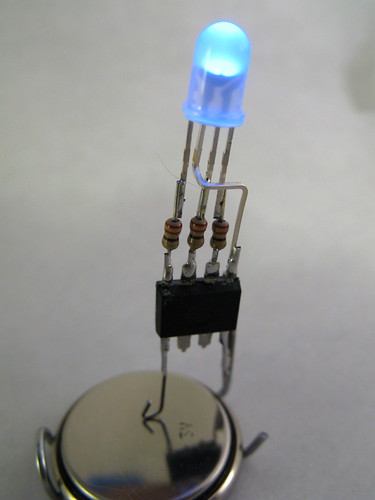
The particular LED used for this Smart LED is a common anode one with a diffused lens. The common anode is connected to the positive power connection instead of ground, and all the on/off logic for the LED in the software must be flipped.

The software for this Smart LED is just a simple 3-channel software PWM color fade similar to Clay Shirky’s Arduino example.

Adding senses to the Smart LED

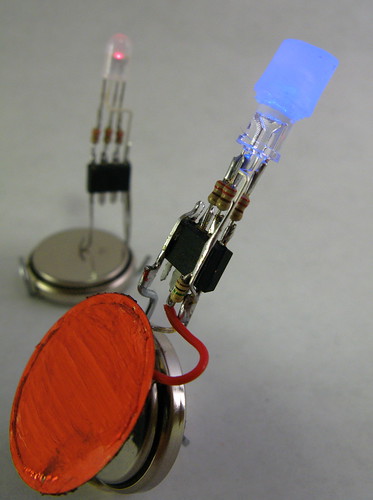
As with Alex’s Programmable LED, adding senses to a Smart LED is easy. Instead of a photocell, let’s add a piezo element ripped from an old buzzer and used as a knock sensor. Using piezos as knock sensors is easy. By soldering the piezo directly to the Smart LED, a nice little package is made.

The algorithm initially implemented for this Smart LED is a RGB color change like before, but if the piezo is struck, the LED turns white for a moment, then decaying down in brightness before returning back to the color changing.

In this case, a common-cathode RGB LED with crystal-clear lens was used with a small diffuser on top.
RGB LEDs and Diffusers

Most RGB LEDs you can find have a really narrow viewing angle, making them useful for flashlights maybe but not for ambient indicators. And because the red, green, and blue LED die are off axis from the integral lens that creates the narrow viewing angle, you don’t get very good color mixing. Sometimes you can find diffuse integral lenses on RGB LEDs (like the smaller smart LED pictured) but more often the lenses are crystal clear.

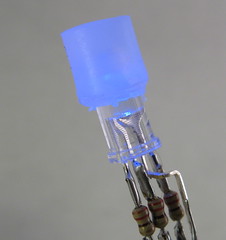
By placing a small dab of diffusive material on top of the LED, the light is mixed and diffused. In this case, a cylinder of unmelted hot glue was used:
And then you can get a wide range nicely mixed colors:
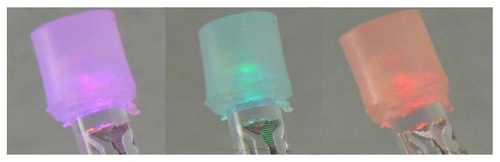
ledcolors-500.jpg

Smart LED Prototype Programming

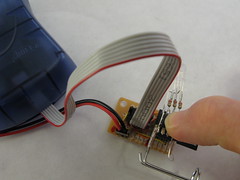
The fun part about building these devices is that you can reprogram them after you’ve constructed them. That is, if you’re careful and leave the back of the chips exposed. With the backs exposed you can press them only an 8-pin socket that is connected to a standard AVR ISP connector.
Smart LED Prototype Software

The software is really pretty easy stuff once you’re over the hurdle of AVR programming in general. As mentioned above, Arduino is a great place to start and you can review the Spooky Arduino class notes for a directed introduction.

After you know Arduino, it’s a small step to program AVR chips directly. You’ll need something like the AVRISP mkII programmer (about $35 from Digikey).

This particular software is kinda tricky because it implements software PWM. The software PWM code is directly borrowed from Atmel Application Note #136, “Low-Jitter Multi-Channel Software PWM” by Andy Gayne. I’ve successfully used the code to scale up to 16 software PWM channels and here, down to 3. At the 4.8MHz clock, the PWM rate is about 73Hz, which is low enough to cause beating with the 30 Hz rate of the video below. The PWM frequency could be increased with a few timer changes, but the rate isn’t visible to humans and any changes away from a known-working system should be avoided.

The software:

The code was quickly thrown together from another project, so the comments are either non-existent or misleading.

Smart LEDs Video Demo

Here’s a little demo of both of the Smart LEDs.

39 Responses to “Smart LED Prototypes”

I’ve programmed arduino’s before but not sure how close this is to that enviroment? Does the code for these chips need to be programmed in C? when you say “If you know how to program an Arduino, you can program one of these chips. ” what do you mean? are they identical? any help much appreciated.

best

bert

Yes, it’s all in C, and you compile the code from the command-line using a Makefile. The Arduino “language” is also C and the steps that the Arduino GUI goes through to build your sketches into executable code and program the board is almost exactly what the Makefile does. Arduino takes care of these details and the code to set the Arduino chip up, but otherwise it’s very similar.

A good way to start out is getting an AVRISP programmer and reprogramming the chip on the Arduino board without using Arduino. Once you’ve gotten the hang of that, you can move to different chips like this ATtiny13 which is very similar (but has much less memory, few I/O devices, etc.)

hi there,

thanks for that, do you have any good references or book to point me at to learn how to program C for the amtel family? At the moment I played around with programming ATTINY2313 using avrdude and a simple AVRISP (came with minipov) but am mainly just re-utilising the code that I’ve found. Would be nice to learn it rather than copying it. One thing I did find frustrating was testing, it took me so long to upload it to the chip then to see if it works. Thats why arduino was nice because it verifies your code and uploads it really quickly. any help much appreciated.

Out of interest how fast does it take to upload your file to the chip using the amtel AVRISP? and avrdude?

cheers bert

Hi Bert,

Using AVRISP over USB, programming takes just a one or two seconds. If it takes much longer than that, the “sclk” setting inside the AVRISP needs to be changed.

I’ve found the “C Programming for Microcontrollers” from SmileyMicros to be a good intro to AVR C programming. It’s based around the $20 AVR Butterfly board but the techniques are applicable for most all AVR chips.

If you’re familiar with Arduino, perhaps the best way to get into it is to use the Arduino board as just a carrier for the ATmega8 chip it has on it and reprogram it. Learning how the Arduino GUI does it’s job is very instructive. Check out the Arduino PinMapping, the BuildProcess, and how to program Arduino from the CommandLine.

From there it’s a small Makefile change to program the ATmega8 on the Arduino directly instead of using the Arduino bootloader. Burning your own code to the Arduino ATmega8 is just the same as burning the Arduino bootloader.

Hi there,

thanks for that, much appreciated. WIll give it a go.

cheers

bert :-)

neato!

Hi todbot,

great! I like your smart LEDs. Nice idea to make it touchable. Maybe we should do a version that is able to listen?
And you solder better than I do. ;)
BTW: I have a new instructable, based on the same circuit. It simulates the synchronizing of fireflies: http://www.instructables.com/id/ETKA2PCF05JJP4O/

Kind regards,
Alex

Hey, this is great — awesome. I think you’re definitely onto something here. Like, a lot of time and energy goes into doing something very simple that lots of people are trying to do with LEDs — everything from sourcing stand-alone PWM components to deciding which microcontroller to use based on whether it has enough PWM channels — can be taken care of with an LED that has such features built in already. I’d buy one for sure!

The fab processes for these types of LEDs (GaN-based) and a microcontroller are actually very different because of the material properties. GaN circuits are still in their infancy because of problems growing quality wafers, and CMOS relies on high quality substrates plus silicon dioxide (the Oxide in CMOS) which you don’t get for free on GaN. I am guessing that the color changing LEDs have multiple die in one package for these reasons. Really not a problem since the size of a typical LED is HUGE compared to the actual light emitting device inside!

Yeah I figured the processes were different, especially for blue LEDs. But, as you say, since we have this nice large epoxy container, it should be possible to encapsulate a few LED dies and a microcontroller die in one 5mm resin package. Using bare die seems a fairly common practice now as most of the really cheap electronic gizmos wire up a logic die directly on a cheap circuit board and then plop a dab of epoxy over the entire thing.

I’ve looked at a few of these RGB LEDs under a magnifier, and they definitely look like different dies joined electrically, which made me wonder if the construction techniques for LEDs and cheap gizmos are really all that different.

[...] Smart LED Prototypes [...]

[...] The LEDs I used emit the light mostly straight up. So a kind of reflector is needed. I used a piece of paper which is located 5 mm above the LEDs. For the next version I would take LEDs with a wider light emitting angle and use a kind of diffuser, as proposed by Tod for his Smart LED Prototypes. [...]

Hello Todbot!

Love the Arduino tutorials! I have a question… I want to be able to develop my AVR apps using the Arduino board/software; then burn my sketches to offboard chips for use in projects like this smart LED.

I gather that I need the AVRISP USB programmer, but I’m PPC Mac based. What software can I use to upload/burn the sketch from my G5 iMac?

[...] web for some example ADC code for an ATTINY13 I’m playing with, I came across a comment from this post in which the author [...]

…kewl stuff, good work further like this!

best regards
hoewe

[...] LED Prototypes – [Link] Tags: Led, RGB Filed in [...]

[...] took the idea of a programmable LED to a new level. He sees them as Smart LED Prototypes, which means, you can add sensors and controllers and combine them into a single unit. This unit [...]

[...] board design/function modeled after the BlinkM from ThingM flickr photostream about the blinkM Tod E. Kurt’s post about software PWM in smart LED’s Smart LED device idea comes from Tod E. Kurt’s talk on “Things at ThingM” as well [...]

Hello,

To start off I need to tell you that I know almost nothing when it come to technical electronics, but I love to play around with led lights. I have two tri-color leds identical to the ones in your pic’s… All I have are the lights and batteries… What do I need and how do I get a solid white beam out of the light ( I don’t need them to blink or flash ). Any help would be greatly appreciated.

Hi Jason,
When working with LEDs, you always need resistors to go along with them, otherwise they’ll burn out by trying to draw too much power from the power source they’re hooked up to.

But once you have battery, resistor, and LED, you’ve got an LED flashlight. Your tri-color LEDs are really 3 LEDs in one package, so you’d need 3 resistors, one for each. Powering on all 3 of the LEDs inside the RGB LED makes it glow white, turning on or off just some of the 3 give you various colors.

If you google around, you’ll find lots of “LED tutorials” on the net. They’ll all give you similar information. I’m partial to the LED stuff in my “Spooky Arduino” class I gave last year. If you go to page 24 of the Class 1 notes you’ll get an intro into how to hook up LEDs with a 9V battery.

The value of the resistor you use determines how bright the LED gets. The lower the value, the brighter the LED. Up to a point. For your stuff, I would make sure all your resistors are 500 ohms and above. And I’d get several different values to play around with. If you’ve seen the “LED Throwies” on instructibles.com, you’ll notice they don’t use resistors; this is because the coin cells have a sort of built-in resistor.

Oh and if the only thing you want is white light, it will probably be easier to use white LEDs instead of the RGB LEDs.

Todbot,

Thanks for the explanation I saw in the picture that you had the resistors on your leds, but wasn’t sure if I needed them to get the light to work (plus I don’t have any at the moment). Your response gave me great insight towards other questions that I had about types of resistors and such. Yes, you are also right it would be easier to just use a white light, and I have those, the reason behind the tri-color is because of the effect it produces when spinning or moving at high speeds. I also have some tri-color leds that I’ve come across that have a chip inside the light head that blends the colors in a fade mode (fading from one color to the other producing a rainbow effect) after about five seconds it switches to a blink mode. I’ve made a few toys out of these and it’s a trip to watch. Well, thanks again for the help and if you would like I could make a video clip of the leds I was referring too.

Jay

Hi Jay, I have some of those RGB LEDs that (very crudely) color fade between red, green, and blue over about 5 seconds. They don’t blink though. I’d like to see a video of those LEDs you have, and a link on where to get them. :)

Hi todbot
Do you know how to mix the color of RGB LED to match the color display on the computer? We want to design the display panel

-Gordon

Hi Gordon,
I’m not quite sure what you’re asking. Almost all RGB LED projects take three 8-bit numbers to set red,green, & blue, just like the three 8-bit numbers used to set an RGB on a display. Or are you asking how to physically mix the light? One uses some sort of a diffuser to do this usually. A diffuser is usually some sort of semi-transparent or frosted material, like white plastic.

I’ve got these pieces of info from Wikipedia…hope it will help

# LEDs can emit light of an intended color without the use of color filters that traditional lighting methods require. This is more efficient and can lower initial costs.
# The solid package of the LED can be designed to focus its light. Incandescent and fluorescent sources often require an external reflector to collect light and direct it in a usable manner.
# When used in applications where dimming is required, LEDs do not change their color tint as the current passing through them is lowered, unlike incandescent lamps, which turn yellow.

where did you get the RGB leds?

Hi piboer,
For the Smart LED prototypes, I got almost all my RGB LEDs from various suppliers on Ebay. Do a search for “rgb led” and you’ll find tons of different types. You generally have to buy in quantities of 25 or 50, but that’s still only around $20 total.

If you’re unsure what kind of RGB LEDs to get, check out Sparkfun, FunGizmos or similar purveyor of fine hacking components. One of the best things about these companies is they’re run by tinkerers just like us, stocking the parts they like the best. It means they’re a great filter for the daunting variety of electronic parts out there.

Hey Todbot,

Thanks for the great blog posts. I’m getting a really noticeable “flicker” when running the softpwm_t13.c. I’m not using a switch and was just trying to get smooth fading between colors on my common annode RGB LED. Is there anywhere in the code that you could point me to what I might be able to change to make the fading smoother?

I’m using a 4.5v power supply and everything seems to be working fine expect for the flicker.

Thanks for any directino

Hi Justin,

You probably need to set the CLKDIV8 fuse, which makes the chip operate at 8MHz instead of 1MHz. To do this with my code & Makefile linked above, do a “make erase” to set the fuses and then “make program” to reprogram the chip.

Awesome. thank you. setting the fuse was definitely the problem.

Hi Todbot
I’m also getting a very noticeable flicker that gives you a headache if you look at it for too long. I’ve used the code that you provided with no modifications, I’m using avrdude with a parallel programmer. any ideas the chip is a attiny13v, thanks for any help you may be able to provide.

Tim

Hi Tim,
The mention of flicker makes me think that the fuses are set incorrectly, and the chip is running at 1/8th speed because the CLKDIV8 fuse is set. The flicker is maddening, right at the frequency to give one seizures it seems. ;)

In the Makefile above you’ll find a target called “erase” that will erase the chip and set the fuses correctly. So try doing a “make erase” then a “make program” (if you’re using the Makefile), or use whatever tools you have to flip the CLKDIV8 fuse.

I had more or less the same idea ~4 years ago, and came up with a similar circuit (used Tiny25, though in retrospect I could have gotten away with a Tiny13) for my RGB Christmas tree lights. Each light module has a linear power supply (with 50 feet of wire and wildly-varying loads, voltage drop would have been a major problem otherwise), Tiny25, resistor array (one for green, one for blue, and two in z-shaped series for red), a couple decoupling capacitors, and (of course) the RGB LED.

Take a look at my tree in action: http://www.youtube.com/watch?v=U5qR9_8KGPU

I know the first 34 seconds aren’t terribly impressive. Stick with it. It gets more exciting when the first chorus starts, and looks really cool at the song’s climax after the bridge as the final chorus starts.

PS if you run into anyone with the means to actually make smart LEDs, let me know… I’ve learned a lot over the past couple of years about what capabilities are really important, and what capabilities seemed like they’d be important, but ended up being irrelevant in real use on the tree ;-)

[...] todbot blog » Blog Archive » Smart LED Prototypes Electrically, an RGB LED looks like three LEDs. An Atmel AVR ATtiny13 is the microcontroller brain. In this design the ATtiny13 is running at 4.8MHz from … todbot.com/blog/…/smart-led-prototypes/ – [...]

[...] Smart LED Prototypes – LEDs should be smarter. Sure we have flashing LED assemblies and even rudimentary RGB-flashing discrete LEDs. But LEDs themselves are predominately just dumb lights. There’s no real reason for this. Fab processes for microcontrollers … [...]

Todbot: I have been building robots for a while now. I want my current one the have smart sensors (IR sensor, accelerometer, light detector, touch sensors) and the like but I don’t want to use up the Arduino’s processing time looking at them all the time. Do you think the aTtiny13 would work for sensor input?

Octopart.com shows that there are many flavors of the aTtiny13. Would any of them work with the AVRISP programmer?

Thanks

Hi techiebot,
Every 8-bit AVR chip is programmable with the AVRISP, with the exception of the weird ones, like maybe the 6-pin ones. You can definitely program an ATtiny13.

But also, I wouldn’t be so quick to offload sensor reading tasks to an ATtiny if you’re using Arduino. I would try using just the Arduino first and see how far you can get. If you find you’re running out of cycles, at least you’ll have some working sensor-reading code that you can pretty quickly port to an ATtiny.

[...] pretty easy to do, and cheap: http://todbot.com/blog/2007/03/25/smart-led-prototypes/ If you don't own an AVR programmer it will be a bit more [...]

Something to say?