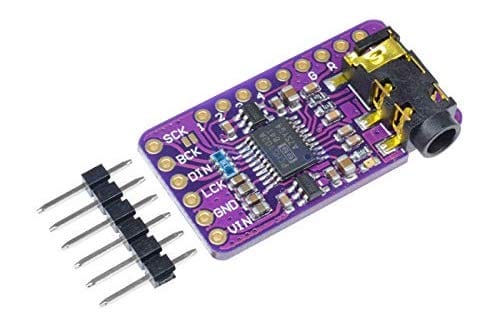
I am a big fan of these PCM5102A I2S DAC boards (3 for $15! affilliate) for playing around with audio synthesis, for example in this video about new `synthio` CircuitPython library or this repository about Mozzi Arduino synthesis. They have pretty high-quality audio output up to at least 16-bit @ 44.1kHz and separate out all the audio circuitry onto its own board with its own regulator! This makes it much less likely that your circuit’s noise will infect your audio. And the line out is strong enough to drive most headphones. The board itself is pretty small too at 29mm x 16mm.
Hooking the up PCM5102 board is pretty easy for the general case:
SCK – Gnd
BCK – I2S bit clock pin
DIN – I2S data pin
LCK – I2S word select pin
GND – Gnd
VIN – 3.3V
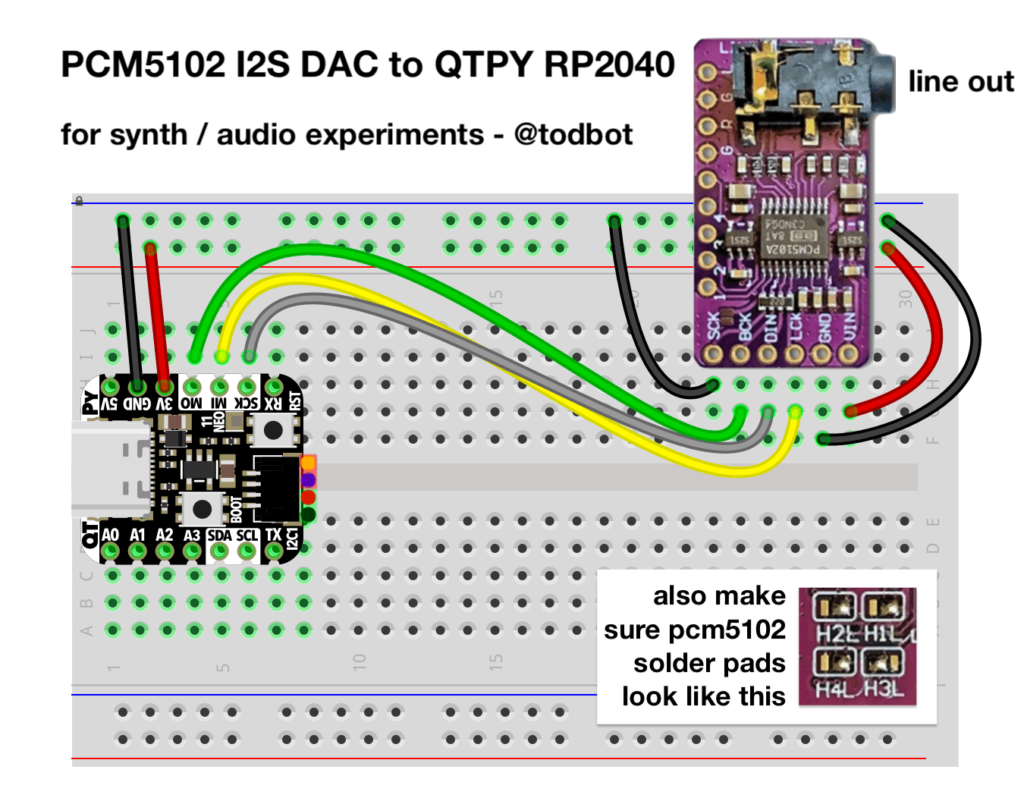
In the case of hooking up the PCM5102 board to an Adafruit QT Py RP2040, one way to do that is like this:
The corresponding CircuitPython setup using audiobusio.I2SOut() for the above wiring looks like:
Note that the back of the PCM5102 board has several solder jumpers to configure the chip. Most vendors will set these to a good default value, but verify if they match the above inset photo above or the yellow box in the photo below.
Most of the information I gleaned about the PCM5102 board I got from this macsbug blog post. It is very handy. From it is also the schematic for the PCM5102 board, included below:
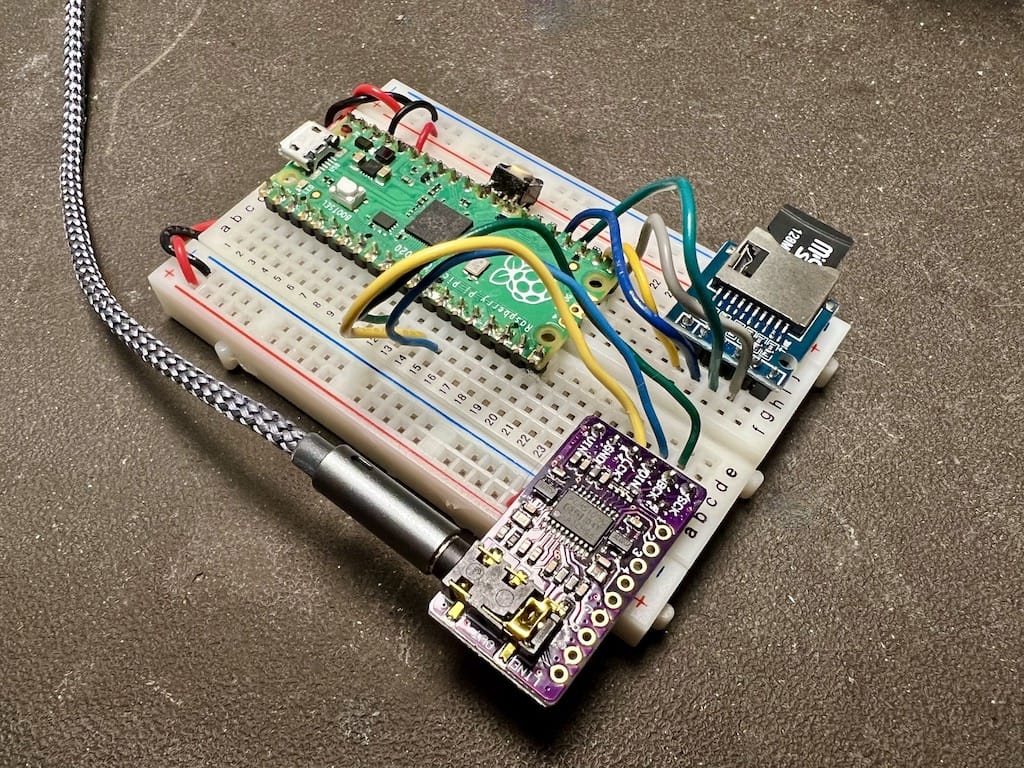
Here’s a complete SD-card based WAV player using a Raspberry Pi Pico and a PCM5102
And the CircuitPython code that plays WAVs off an SD card:
# i2s_sdcard_pico.py -- I2S Audio from SD Card on RP2040 Pico
# 20 May 2022 - @todbot / Tod Kurt

import time
import board, busio
import audiocore, audiomixer, audiobusio
import sdcardio, storage, os

# pin definitions
i2s_bclk = board.GP9  # BCK on PCM5102 (connect PCM5102 SCK pin to Gnd)
i2s_wsel = board.GP10 # LCK on PCM5102
i2s_data = board.GP11 # DIN on PCM5102
sd_mosi = board.GP19
sd_sck = board.GP18
sd_miso = board.GP16
sd_cs = board.GP17

# sd card setup
sd_spi = busio.SPI(clock=sd_sck, MOSI=sd_mosi, MISO=sd_miso)
sdcard = sdcardio.SDCard(sd_spi, sd_cs)
vfs = storage.VfsFat(sdcard)
storage.mount(vfs, "/sd")

# audio setup
audio = audiobusio. I2SOut(bit_clock=i2s_bclk, word_select=i2s_wsel, data=i2s_data)
mixer = audiomixer.Mixer(voice_count=1, sample_rate=22050, channel_count=1,
                         bits_per_sample=16, samples_signed=True)
audio.play(mixer) # attach mixer to audio playback

# find all WAV files on SD card
wav_fnames =[]
for filename in os.listdir('/sd'):
    if filename.lower().endswith('.wav') and not filename.startswith('.'):
        wav_fnames.append("/sd/"+filename)
wav_fnames.sort()  # sort alphanumerically for mixtape numbered order

print("found WAVs:")
for fname in wav_fnames:
    print("  ", fname)

while True:
    # play WAV file one after the other
    for fname in wav_fnames:
        print("playing WAV", fname)
        wave = audiocore.WaveFile(open(fname, "rb"))
        mixer.voice[0].play(wave, loop=False )
        time.sleep(3)  # let WAV play a bit
        mixer.voice[0].stop()
In many LED animations, you need to apply an operation to all LEDs as fast as possible. Often this is something like “fadeToBlackBy”, i.e. “dim all LEDs by a given amount”. There are some common effects you get by using “fadeToBlackBy” and one other action. For example: the Cylon effect is “Turn an LED on, Fade all LEDs toward black, Go to next LED, Repeat”. A simple firework simulation is “Turn on random LED, Fade all LEDs toward black, Repeat”.
Since I don’t come from a normal Python background, I’ve not used much Numpy. But I knew it was great for vector math. And I knew CircuitPython had a minimal version of Numpy called ulab it inherited from Micropython. Even though I’d seen the wonderful ulab learn guide that jepler did, the usefulness of numpy/ulab didn’t sink in. It was only when I was hacking on LED animation speedups did I re-stumble upon ulab. And am I glad I did.
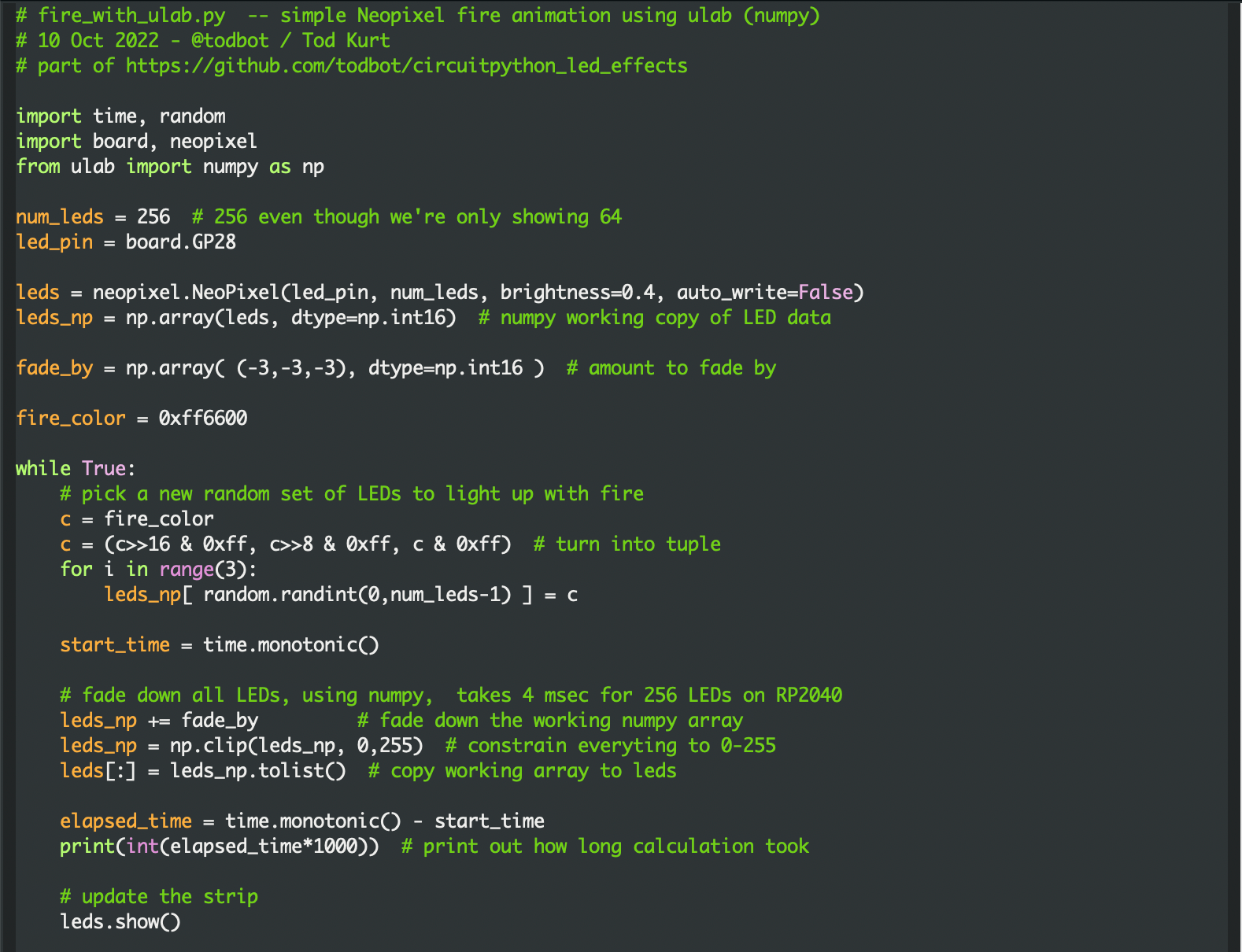
As a test with a simple fire animation (as optimized as I could make it in normal Python), the results with ulab are striking:
fire_no_ulab.py: ~40 milliseconds per frame for 256 LEDs on RP2040
The general technique is to create a “working copy” of the LED data in a ulab array, and use ulab functions as much as possible to modify that working copy. Then at the last possible moment, copy the working copy data to the real LEDs object. It only adds a few lines of code to existing solutions and you get access to all these cool ulab array functions for LED effects! For instance, to constrain all RGB values of all LEDs to 0-255, this is a single line in ulab: leds_np = np.clip(leds_np,0,255). And it further cements my belief that any time you’re doing a for-loop on a large list in Python, you’re probably doing it wrong. :-)
Screenshots of functionally identical code, before / after:
The video demo below shows the difference (also available on youtube). Each setup is identical, calculating for 256 LEDs even though only 64 are displayed. The “no ulab” case is perfectly usable if a bit choppy, but you lose ~36 milliseconds where you could be doing something else. (Like, for instance, these LED matrices are wired up in a serpentine pattern, so you need some math to unravel that if you want to draw shapes). The ulab version seems much smoother and more organic, at least to my eyes.
Did you know you can run multiple displays in CircuitPython? One way: wire up two displays in parallel.
There’s also true dual displays, more on that in a bit. For the above, here’s the wiring diagram and the code “gc9a01_hellocircles_compact.py”. Note how the second display is hooked up in parallel and the code just sees one display.
But what if you want each display to be independent?
Almost all CircuitPython boards support a display. CircuitPython makes it really easy to configure a display’s driver and all displays act the same for drawing images and text: monochrome OLEDs, RGB TFT LCDs, even ePaper!
But only a single display is supported for the pre-built versions of CircuitPython (The one exception is the MonsterMask) Multiple displays are supported in the design of CircuitPython, but it’s a compile-time setting. This is for RAM savings reasons. That decision is a few years old and I think for modern chips like ESP32-S2/3 and RP2040, there’s more than enough RAM to allow that default to go up to two.
Compiling CircuitPython to Add Second Display
In the meantime, we can re-compile CircuitPython ourselves to increase that limit. It’s pretty easy if you’re comfortable with the command line. If you’re already know how to build CircuitPython, the short answer is:
Add this line to your board’s mpconfigboard.h: #define CIRCUITPY_DISPLAY_LIMIT (2) recompile and install the resulting UF2 file.
If you’ve never compiled CircuitPython before, there is a very useful Adafruit Learn Guide building CircuitPython. I recommend start there and go through each step. This post is not that. This post is a reminder for myself, with an abbreviated version those steps that I can just copy-n-paste when I want an entirely fresh checkout. Not all of these steps are needed if you already have a checkout.
First: initial git checkout, getting the git submodules, and installing python requirements.
git clone https://github.com/adafruit/circuitpython circuitpython-todbot
cd circuitpython-todbot
git checkout main
pip3 install --upgrade -r requirements-dev.txt
pip3 install --upgrade -r requirements-doc.txt
make -C mpy-cross
Next: do an easy build for QTPy M0 to make sure everything works:
cd ports/atmel-samd
make fetch-port-submodules
make BOARD=qtpy_m0
# or can do: make -j10 BOARD=qtpy_m0   # since you have lots of cores
ls -l build-qtpy_m0/firmware.uf2
cd ports/espressif
make fetch-port-submodules
./esp-idf/install.sh
. ./esp-idf/export.sh
make -j10 BOARD=adafruit_qtpy_esp32s2
ls -l build-adafruit_qtpy_esp32s2/firmware.uf2
For any of these, when you get a .UF2 file, you can copy to your board in UF2 bootloader mode, like a normal CircuitPython upgrade. This is a great way to try the latest changes without waiting for the automated builds on Adafruit’s S3 cache.
Now we can make the change to support two displays. Let’s add two displays to CircuitPython for QTPy ESP32-S2:
cd ports/espressif
echo "#define CIRCUITPY_DISPLAY_LIMIT (2)" >> boards/adafruit_qtpy_esp32s2/mpconfigboard.h
make -j10 BOARD=adafruit_qtpy_esp32s2
Copy the resulting “firmware.uf2” file to install your new CircuitPython and start trying out dual displays!
Using Multiple Displays
You can now wire up multiple displays as needed for your application, CircuitPython doesn’t care: two SPI busses with independent CS/control lines, a single SPI bus with independent CS/control lines, a single I2C bus, or multiple I2C busses.
For example, if using two I2C SSD1306 monochrome OLED displays at addresses 0x3C and 0x3D on the same I2C bus, creating two display objects would look like:
import busio, displayio
from adafruit_displayio_ssd1306 import SSD1306

dw,dh = 128,64 # display width,height
i2c = busio.I2C(scl=board.GPIO0, sda=board.GPIO1) # e.g. on a Pico

display_busA = displayio.I2CDisplay(i2c, device_address=0x3C)
display_busB = displayio.I2CDisplay(i2c, device_address=0x3D)

displayA = SSD1306(display_busA, width=dw, height=dh)
displayB = SSD1306(display_busB, width=dw, height=dh)
Notice you need a display_bus object for each display. For two GC9A01 round LCDs using SPI, you can still use a single SPI bus, but you do need separate CS, CD, RST lines, like:
CircuitPython is an amazing microcontroller programming platform, running on many different chips and boards while providing a consistent API. I’m pretty experienced with embedded development and Arduino, but have little Python knowledge. So for the last few years I’ve been using CircuitPython to teach myself Python. The results I’ve been logging via my QTPy Tricks and CircuitPython Tricks repos. CircuitPython is one of the most fun and useful tools in my toolkit now.
At the beginning of every year, the community reflects on CircuitPython and their plans for its future. This year the tag is “#CircuitPython2022“. Here are my (belated) plans / desires. My overall theme is: audio stuff!
The Big Ones
These are the large efforts that are year-long in scope and perhaps not even possible. But any would put CircuitPython on an entirely new level of usefulness for me.
Modular audio engine. The Teensy Audio Library (TAL) is hugely powerful, able to create synthesizers, audio effects, just about anything to do with real-time audio in and out of a microcontroller. It would be amazing to port it to CircuitPython. CirPy already has pretty robust support for DMA-based audio streams, a main stumbling block to get this functionality I think, but I really don’t know if it’s feasible. There does seem to be the beginnings with audiomixer.Mixer and synthio, but I know nothing. From my recent playing with the Mozzi synth library and Teensy Audio Library on SAMD51, I am eager to see if those concepts can be applied to CircuitPython. I expect it’s beyond my abilities but it would be very cool to see CircuitPython being used to describe audio flows to create custom audio devices. See circuitpython#4467 for more
Periodic code block invocation. So much synth & game code needs regular timing. Example: how would you create a metronome in CircuitPython? Currently one does this by hand by checking time.monotonic() or supervisor.ticks_ms(). This is fine but if you have a displayio display or adafruit_seesaw devices, you are at the mercy of the various delays inherent to those libraries. Yes, this is a variant of the “why no interrupts?” argument, but if it’s periodic and under the control of the CircuitPython supervisor, perhaps the issues can be dealt with?
USB Host! I’m very excited by some recent additions in TinyUSB that adds a USB MIDI host driver. But how cool would it be to plug in a USB keyboard, MIDI controller, or thumbdrive to a CircuitPython device and have it work? See circuitpython #5630 for more
“Small” Changes
These are issues I’ve experienced or changes I want but haven’t characterized enough to submit an issue. And they’re small enough that maybe I can actually contribute on.
Allow play start/end points & loop start/end points for audiocore.WaveFile and audiocore.RawSample. Currently you can tell a sample to loop and it works! This is awesome. The looping functionality could be so much more powerful if the start/end points could be modified.
Allow RawSample buffer to be replaced. Currently once you create a RawSample, it’s read-only.
Why does audiocore.AudioMixer seem to mess up with multiple small RawSamples?
The adafruit_seesaw library and its descendants are very conservative about timing with explicit time.sleep() calls to ensure good data. This kills update rate when using several Seesaw devices. I’d like to try tuning these or at least propagating up the delays to the user.
Newbie-friendly documentation changes for “Core” modules. The docs for the built-in C-based libraries are really good if you know what you’re doing. They function well as reference material. But if you’re new to a concept, they can be a bit mystifying. And you can’t look at the Python source because they’re in C. I’ve had this problem a few times and this point is a reminder to myself: when this happens to me again, make a PR with what I think would help.
Projects for 2022
Some projects I plan on doing in CircuitPython in the coming months:
Tiny USB + Serial MIDI keyboard using KB2040 and Kalih key switches. Oh no another CircuitPython keyboard! I always need small MIDI controllers. The OMX-27 I have is great, but I broke its encoder, it’s hard to repair, and I want something smaller. And I’ve not played in the “keeb” space so this’ll be my entrée to that world.
“Additive synthesis” using stacked RawSamples. In CircuitPython it’s really easy to compute and play samples on the fly. Can I use this to create a kind of wavetable synthesizer by mixing samples through an audioio.AudioMixer?
Seesaw Knob & Button board. Of the little Seesaw IO expander board’s 15 GPIO pins, 9 can be ADC pins! I want a Seesaw board that has 8 pots, 4 buttons and some NeoPixel / WS2812 LEDs. This seems like it should be a thing? Why isn’t this a thing? I will make it a thing.
“Tiny LED Effects” library submitted to the CircuitPython_Community_Bundle. This is a small collection of functions I use on QTPy M0 where adafruit_led_animation and adafruit_fancyled will not fit. It’s a neat bunch of generative LED effects with its own optional cutdown version of neopixel, I just need to package it up.
Closing Thoughts
The CircuitPython community is the best I’ve experienced. I feel privileged to be considered part of it. I’m always learning something new about some aspect of Python, different processor architectures, or some new algorithm or technique. If you’re interested in CircuitPython, please join the Discord! I can’t wait to see what 2022 brings.
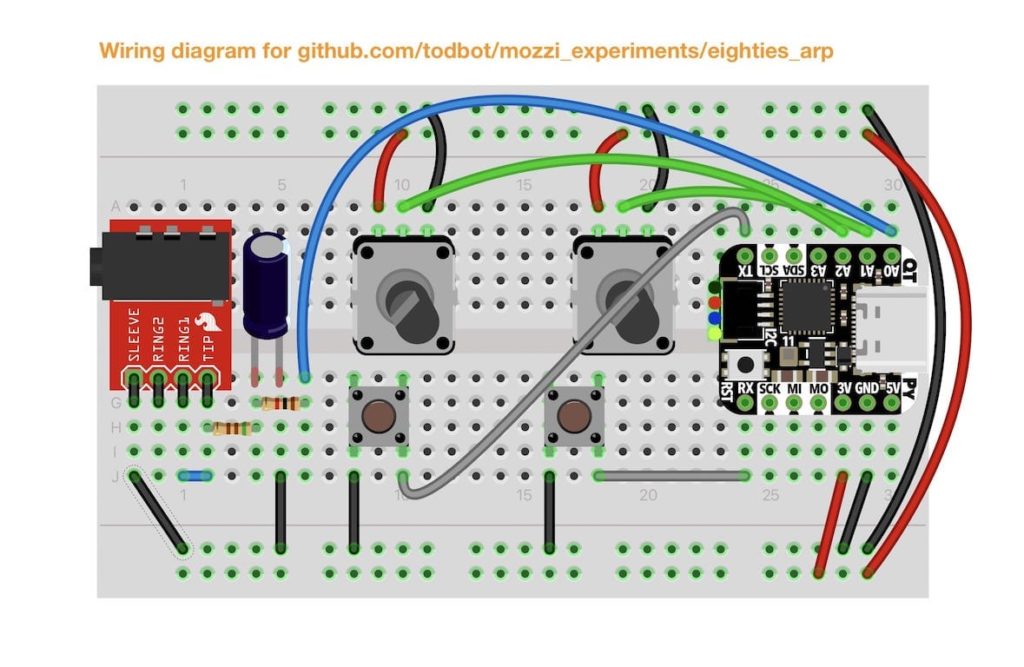
eighties_arp – An arpeggio explorer for non-musicians and test bed for my “Arpy” arpeggio library
derpnote2 – A sound like THX “Deep Note” with 16 saw oscillators that converge to a chord
Arpy Arpeggiator Arduino library
Inside of the “eighties_arp” directory is “Arpy.h“. This is a small arpeggiator class that has some knowledge about music theory. An example that uses this is John Park’s Arcade Synth Controller. The library’s API is purposely very simple:
void loop() {
  // read knobs, set root_note and bpm
  arp.setRootNote( root_note );
  arp.setBPM( bpm );
  arp.update();
}
Mozzi is an audio synthesis library for Arduino that can do multi-oscillator synthesis with filters and modulation on even an Arduino Uno.
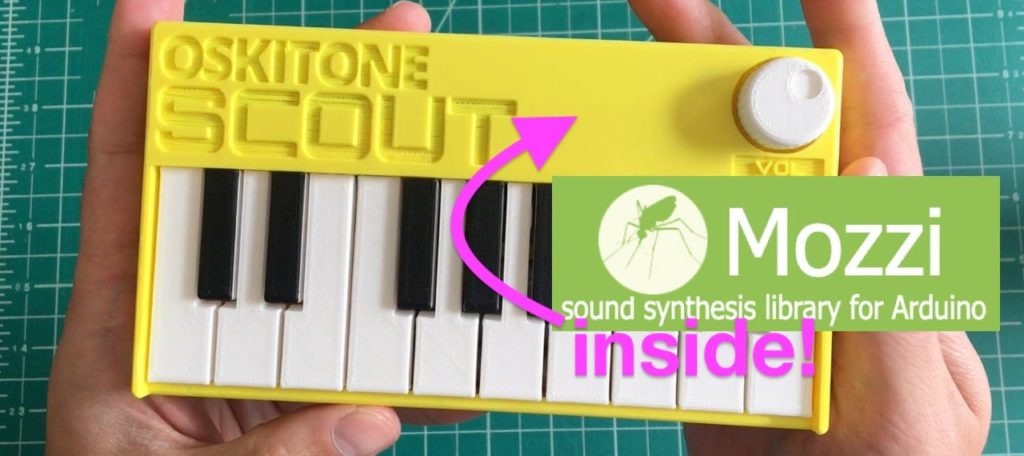
Oskitone Scout is an adorable tiny keyboard kit, based on an Arduino Uno and entirely open source.
I’ve been playing with Mozzi recently after first hearing about it many years ago. The Scout seems like a perfect platform for those experiments. I’ve been putting on these experiments in the MozziScout github repo.
Here’s some examples of using Mozzi on Scout, along with the small mod needed to make it work.
mozziscout – a straight-forward Mozzi version of the ‘scout‘ sketch that comes on Scout
mozziscout_monosynth1 – a fat mono synth, made of two detuned oscillators and a single resonant low-pass filter. Also features different startup modes to tune synth paramters. (see sketch for details)
mozziscout_drums_bass – a 4-voice drum sample kit (bd,sd,oh,ch) and a single oscillator synth in one!
mozziscout_poly – a poly synth, sort of. Scout’s keyboards doesn’t allow true playing of chords, but with a slow release envelope and the playing of arpeggios, you can make chords
mozziscout_thx – an eight-oscillator stacked sound where the oscillators start at a random pitch and slowly converge to a chord. Vagugely based on THX Deep Note
Demos
“mozziscout_monosynth1”
“mozziscout_poly”
“mozziscout_thx”
How to mod your Scout
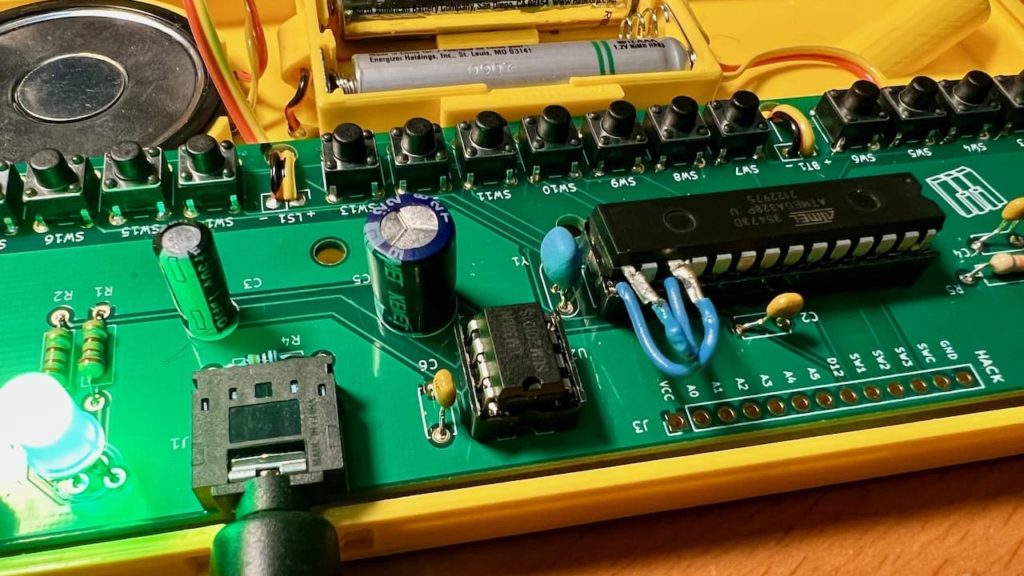
One way two swap this is where the two legs of the ATmega328 chip are lifted, and jumper wires are soldered on and plugged into the socket, as in the photo below.
Using normal Scout code
After this mod, you can still use your Scout like normal, just make sure to swap pins 9 & 11 in the code.
Mozzi is not in the Arduino Library Manager, but installing it is pretty easy anyway. The installation process is the same way you hand-install any Arduino library.
You will get a “Mozzi-master.zip” file. Rename it to “Mozzi.zip”
In the Arduino IDE, go to “Sketch” -> “Include Library” -> “Install .ZIP library…”, then pick your “Mozzi.zip” file.
Once it completes, you will see Mozzi in the list of available libraries and the Mozzi examples in “File” -> “Examples” -> “Mozzi”. Many of the examples will work with Scout but not use the keyboard.
Using Mozzi
Mozzi is very particular about what is in loop(). Do not put anything else in there. Instead put it in the void updateControl() function. See the sketches for examples.
Mozzi output is quieter than standard Scout (which outputs full-width square waves). Use an external amp for best results.