Archive for the 'hardware-hacking' Category

Get on the BlinkM Bus with a BlinkM Cylon

Posted by todbot on June 17th, 2008

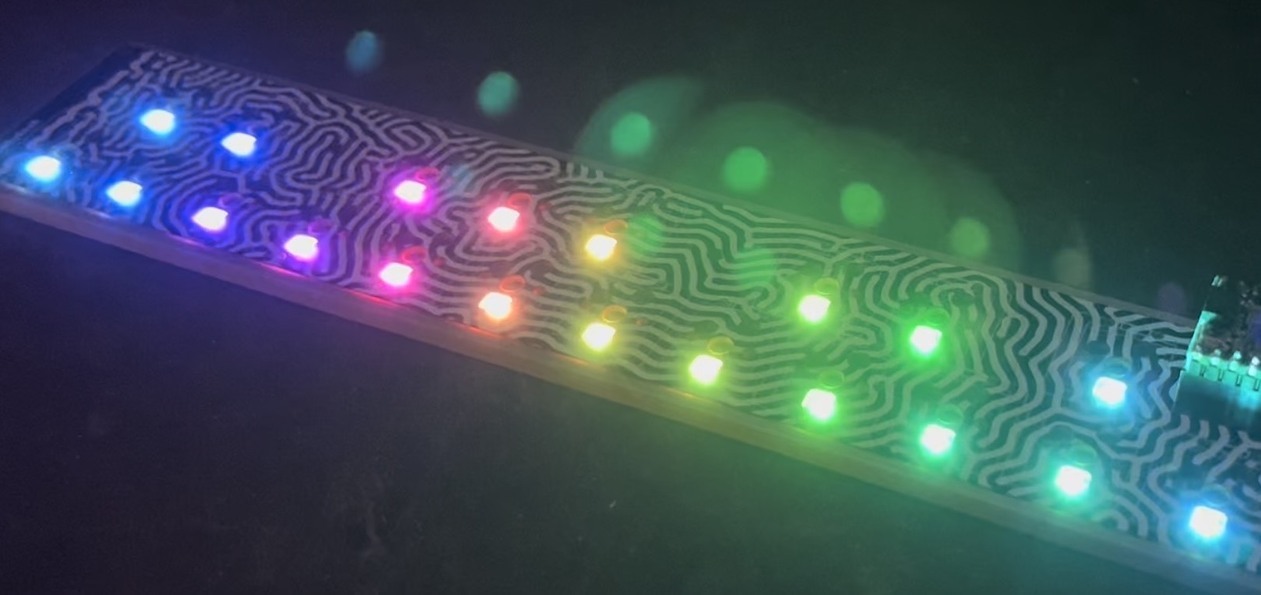
BlinkMs are a lot of fun by themselves, but they’re also little network devices, each having its own address on an I2C network. Here’s where I think BlinkM can really shine since it makes controlling multiple RGB LEDs pretty easy. For Maker Faire, I wanted to show off this facet by having a single Arduino control a dozen or so BlinkMs on a single I2C bus. The result is shown in the little video below.

Read on for how this was put together.

Read the rest of this entry »

FunGizmo’s colorful tiny breadboards

Posted by todbot on April 28th, 2008

I just received some colorful tiny mini-breadboards from FunGizmos.com. They are pretty great. Now quickie ideas prototyped with Arduino can be even smaller than the “1¢ Arduino under-shield”.

They appear to be the same quality as the other breadboards I have, just different color plastic. I can already tell the colors will help me differentiate projects, which all tend to look alike from 10 feet away. Normally when you buy these from Digikey or similar places, these little ones cost $7 a piece. FunGizmos has them for $5.40. And that’s cheap enough to get a few. Note that all these tiny breadboards don’t have the side power busses like the larger breadboards do. That’s the price you pay for tininess.

“WiiChuck” Wii Nunchuck Adapter Available

Posted by todbot on February 18th, 2008

Want to hook up a Wii Nunchuck to an Arduino but don’t want to cut up the cord on your Nunchuck? Yeah me too. So I made some of these:

wiichuck_adapter1.jpg

wiichuck_adapter2.jpg

It’s a small PCB that adapts the Wii Nunchuck connector to standard 4-pin header. I call it the “wiichuck adapter”. It plugs directly into the Arduino, no wiring necessary. You can get one too for $4.

Available from the following wonderful shops:
- FunGizmos.com. International shipping for $1 more.
- Tinker.it (UK)
- Little Bird Electronics (Australia)

Read the rest of this entry »

Bezel for Sparkfun’s “Monome-like” Button Pad

Posted by todbot on January 31st, 2008


sparkfun-buttonbezel1.jpg

This is a laser-cut acrylic bezel for Sparkfun’s Monome-like Button Pad PCB and Button Pad. These 4×4 Button Pads are great: big chunky buttons with a PCB that can take an RGB LED. JMG is making a “monomuino”, a Monome work-alike using this pad and an Arduino. And he’s extending the Monome functionality since his indicator lights can display 3 dimensions of data instead of the normal 1 of Monome.
Read the rest of this entry »

BlinkM Hello, Video Guides, Example Code

Posted by todbot on January 25th, 2008

This is a BlinkM:

BlinkMs are “smart LEDs”, a type of smart interface component. A BlinkM consists of an ultrabirght RGB LED backed with a microcontroller with built-in knowledge about 24-bit color spaces, color fading, and color pattern generation. All in a package 0.6” wide. You talk to it over I2C, a serial protocol spoken by many different things. (Arduino speaks it, as do Basic Stamps, and your PC) And you can have over 100 BlinkMs on the same serial bus, each individually addressable. Here’s how they can hook up to an Arduino:

BlinkMs are available from SparkFun (US) and Little Bird Electronics (AU). It’s hard to show in just static pictures how fun and easy it is to play with BlinkMs, so here’s a few quick video guides.

Video Quick Start Guide

A video version of the BlinkM Quick Start Guide.

Playing with BlinkMTester

A demonstration of one of the example Arduino sketches “BlinkMTester”, which lets you exercise a BlinkM by typing simple commands to the Arduino.

Exampe Code

There are a couple of examples of how to talk to BlinkMs all zipped up in BlinkM_Examples.zip. You can also peruse them unzipped if you like. The examples are predominately for Arduino currently, but any I2C master will work. Some of the examples so far:

  • BlinkMCommunicator
    A simple serial-to-i2c gateway for PC controlling of BlinkM (for instance via Processing or the BlinkM Sequencer)
  • BlinkMTester
    A general tool to play with a single BlinkM
  • BlinkMMulti
    An example showing how to communicate with multiple BlinkMs
  • BlinkMScriptWriter
    A demonstration of how to write BlinkM light scripts with Arduino
  • BlinkMChuck
    Control the hue & brightness of a BlinkM with a Wii Nunchuck

More examples will be added periodically.

For the Arduino examples, a convenience library called BlinkM_funcs.h has been created. Just drop this .h file into your sketch folder and call the functions to start playing with BlinkM.

The complete list of functions is below, though you’ll probably only use a few of them for a particular project.

BlinkM_begin();
BlinkM_beginWithPowerPins(byte pwrpin, byte gndpin);
BlinkM_beginWithPower();
BlinkM_sendCmd(byte addr, byte* cmd, int cmdlen);
BlinkM_setAddress(byte newaddress);

BlinkM_setFadeSpeed(byte addr, byte fadespeed);
BlinkM_setTimeAdj(byte addr, byte timeadj);

BlinkM_fadeToRGB(byte addr, byte red, byte grn, byte blu);
BlinkM_fadeToHSB(byte addr, byte hue, byte saturation, byte brightness);
BlinkM_setRGB(byte addr, byte red, byte grn, byte blu);

BlinkM_fadeToRandomRGB(byte addr, byte rrnd, byte grnd, byte brnd);
BlinkM_fadeToRandomHSB(byte addr, byte hrnd, byte srnd, byte brnd);

BlinkM_getRGBColor(byte addr, byte* r, byte* g, byte* b);

BlinkM_playScript(byte addr, byte script_id, byte reps, byte pos);
BlinkM_stopScript(byte addr);
BlinkM_setScriptLengthReps(byte addr, byte script_id, byte len, byte reps);
BlinkM_writeScriptLine(byte addr, byte script_id, byte pos, byte dur,
                                byte cmd, byte arg1, byte arg2, byte arg3);
BlinkM_writeScript(byte addr, byte script_id,
                          byte len, byte reps,   blinkm_script_line* lines);

And More

For more information, including a datasheet, example code and sequencer application for Mac/Windows/Linux visit blinkm.thingm.com.

If you want to talk about BlinkM, leave a comment or participate in discussions on ThingM’s Satisfaction page.

WineM lights, a BlinkM predecessor

Posted by todbot on January 24th, 2008

With BlinkMs available for purchase soon, I figured it would be neat to show what a large collection of them can do. BlinkMs were created from my desire to have a “smart LED” that did its own tri-color PWM. I didn’t want to build a real-time system to control the PWM of several hundred RGB LEDs. And existing LED controllers didn’t meet my needs. I wanted something that knew a bit about color and color patterns and could be networked together into clusters. Thus BlinkM. A single BlinkM is fun, but the real utility is seen when you have several of them on the same I2C network.

Below are two movies of the lighting system in WineM, our smart RFID winerack. Each place a bottle goes contains a essentially BlinkM and RFID reader controlled via an I2C master.

WineM prototype at NextFest


This video shows WineM in use. A handheld web device allows one to select and display different facets of the wine collection. In the video, first all wines are shown, colored by varietal, then Cabernet wines are selected. Within the Cabernets, color them by year. Select 2002 as the year and only the 2002 Cabernets are shown. Then color those by price. Finally, select the 2002 cabernets that are between $20-$30. You’re left with the perfect wine for tonight’s meal. Also shown is the visual indication when bottles are added or removed.

WineM prototype light tests


This is just a light show using the WineM lights. It was taken right after I had assembled and installed everything in the rack. Apologies for the exposure fluctuations.

For a bit more detail on the WineM prototype hardware, see this post.

Boarduino, Wii Nunchucks, and Servos

Posted by todbot on October 25th, 2007

The Boarduino is an Arduino work-alike kit from Adafruit.com that’s smaller, cheaper, and you can build it yourself.

boarduino

The Boarduino’s small footprint made me want to see how small of a device I could whip up in an hour from some fairly complex components. So I decided to see how small the combination of a Boarduino, a Wii Nunchuck, and a hobby servo motor could be. Here’s a little video of the result.

Read the rest of this entry »

Adding a remote antenna to Parallax’s RFID reader

Posted by todbot on August 9th, 2007

The Parallax RFID reader is a pretty cool bit of tech. For $40 you get a reader with integrated antenna that outputs ASCII at 2400bps. Unfortunately, the integrated antenna means you can’t place RFID tag sensing in tight spaces. You can however circumvent the built-in antenna and add your own. With a remote antenna of your own creation, you can customize its size and shape to fit your application.

parallax rfid remote antenna

First, locate the two places where the circuitry connects to the
antenna. (click the images for larger versions with notes)

Then using an Exacto knife or similar device, scrape away the traces leading to the antenna. This disconnects the built-in antenna. Then scrape away some of the solder mask on each of the traces leading to the circuit and solder down some fine wire. I use wire-wrap wire.

The two wires soldered can then be led to a jack of some sort. I used a 2-pin Molex header I had laying around. Now you can fashion a remote antenna.

To fashion an antenna, you need to create a >1/2″ diameter loop of about 100 turns of 30-gauge enameled solid-core wire (aka “magnet wire”). Radio Shack sells a pack of magnet wire that fits the bill just fine. Wind the wire around something handy, then keep it together with clear fingernail polish. Use a lighter to remove the enamel and solder wires to it.

rfid antenna

If you have an inductance meter, use it to make sure the inductance is between 500-1000 uH.

If the inductance isn’t high enough (i.e. not enough turns) the RFID reader just won’t work and you may even damage it. But then, if you’re taking an Exacto to your reader, you’re probably not so concerned about that.