
I recently obtained a ReadyNAS NV
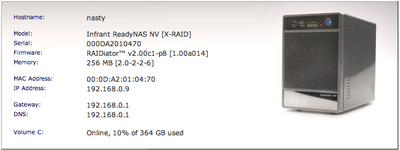
It’s a dedicated Network Attached Storage (NAS) box that does RAID-0, RAID-1, RAID-5, or a proprietary combo of the three called “X-RAID”. X-RAID allows you to start with one disk, move to two, then three, then four, all without rebuilding the RAID or changing RAID levels.
It has a really nice web-based GUI. You would hardly know that deep-down it’s a Linux box running on a custom ASIC CPU containing a SPARC core and 4-channel SATA controller.
When a drive dies, if the temperature gets too high, or various other alert conditions, the web interface updates in real time and it will send you email.
I bought it with one 400GB drive. This gave me 400GB of unprotected storage (JBOD, with only one disk). I then added a 2nd 400GB disk, while it was turned on, and it immediately started building a RAID-1 system, giving me 400GB of protected storage. Below you can the status and log pages for when I had just added the 2nd disk.
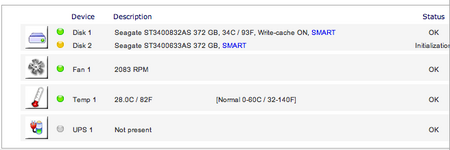
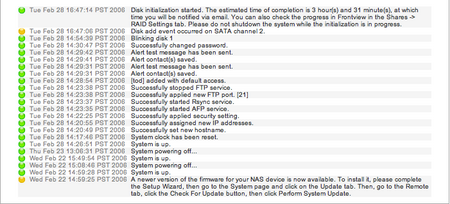
At the bottom of the web UI, it has this little tiny dashboard showing the most important aspects of the device. Of course, all the icons are hot and if you mouse over them they give more detailed text descriptions and if you click on them you’re taken to the relevant status pages.

The box does SMB (aka CIFS, Windows file protocol), AFP (Apple File Protocol, the default protocol used when you connect to servers on Mac OS X, aka netatalk I think), NFS, HTTP, FTP, and rsync.
Of course, Mac OS X can do all of those protocols, but I’ve been using AFP to start since unlike SMB, it deals with character sets better, unlike NFS it deals with connect/re-connect more gracefully, and unlike HTTP/FTP/rsync, it gives me a disk I can mount.
Well that’s pretty cool. But are NTFS junctions truly symbolic and can span filesystems? Judging from the Wikipedia entry, junction points are inherently unsafe. Delete the junction, delete the file.
Regardless, junctions seem to be NTFS entities, not SMB/CIFS ones. I’m not sure if the Samba-derived SMB file server that runs on the ReadyNAS supports all the extra CIFS features like symlinks. It doesn’t appear to be a codepath traversed often in Windows so I suspect not. Also judging by the fact that the original poster created symlinks that were visible in Mac OS X and Linux but not in Windows makes me think that either Samba doesn’t do Windows directory symlinks or Explorer neglects to display them.
Yes, I would say they exist.
Explorer allows you to view and access symlinks and multi-stream files. You just cannot directly manipulate them through explorer.
You can create symlinks through perl’s “symlink()” function, or through sysinternal’s “ln” command, or through the “linkd” command that comes with the W2K resource kit or with the “junction” command that you can get here: http://www.microsoft.com/technet/sysinternals/FileAndDisk/Junction.mspx
nicolaw, you’re right. But does a feature really exist if there’s no way for a user to user it?
Quoting Left by todbot on August 30th, 2006:
“symlinks and Windows? Hahaha, you funny. Windows doesn’t do symlinks. It’s not a feature of the filesystem. The .lnk files are only parseable by Explorer.”
This is incorrect. The NTFS filesystem most definately does support symlinks. It also supports multiple streams and various other features too.
The default explorer interface however, does not give you an interface to manipulate some of these features.
Hello,
I’m using the ReadyNas now for three weeks. It’s pretty cool. I’ve the latest firmware. I didn’t find the webinterface any faster. I’m having the following problem:
The ReadyNas doesn’t accept all files from my osx fileserver. My Apple clients use exotic characters in their naming convention. So it stops after it encounters such a name.
The share I’m trying to write to is SMB and AFP enabled. I’ve also been using the Windows AD users for security. So it’s part of my domain.
Is there a workaround to put the files to the NasReady.
Hi Rory,
I did have one incident in July where the drives got warm enough for it to send me email, but a quick cleaning of the fan vents brought the temperature down again. Other than that I have no problems. I am running Seagate drives which can run hotter, and the ambient temp of the room I have the NV in can get up to 90 degrees. I think the posts on the infrant forum are mostly from folk who try to stick this thing in their media hutch with their xbox and don’t realize that a box o’ drives needs decent airflow.
hey tod, one q.. you haven’t had trouble with the ‘NV’ overheating ? my friend had that issue..
and i’ve seen a bunch of posts complaining about that.
my ‘600’ is fine, tho. so is srip’s,
with the “silent fan” kit.
well.. yeh. I implicitly meant.. mounting the NAS via some other method on both Win & Linux which allows me to make portable symlinks. :-P
turning on ssh access ? sweeeet.
symlinks and Windows? Hahaha, you funny. Windows doesn’t do symlinks. It’s not a feature of the filesystem. The .lnk files are only parseable by Explorer.
I’d say check the Samba docs to see if there’s any way to make it heed symlinks (since the ReadyNAS runs Samba). If there is, send a note to the Infrant guys. They’ve mentioned turning SSH shell access on, so you could conceivable edit the smb.conf file.
symlinks and Window…man, I’m still chuckling.
yeah.. I also have one. It’s freaking awesome.
(hi tod and damian !) I stumbled onto
your website when looking for a way
to make portable symlinks on the ReadyNAS,
so the dir symlinks can be used by Linux,
Windows, and Mac computers.
(well.. I only need just Linux & Windows)
However, I mount it using SMB on both Linux and Windows, and so the only type of “symlinks”
I can create are those windows .lnk files
any ideas ?
also, you should upgrade to the newest firmware.
It offers these fun DHTML menus,
and the webserver on the ReadyNAS is faster.
It still works great. No problems. No more worrying about storage. It Just Works. I did add another drive to it, and it magically converted the volume from RAID-1 to RAID-5 and expanded the volume without any reformatting. That was pretty cool to see actually work.
One thing to watch out for, but this applies to any high-density disk system, is to have adequate cooling and to keep the fan covers and vents clean. The ReadyNAS will email you when it gets too hot and shut down if critically hot, but keeping the system well-ventilated is important.
how do you find the readynas now that you’ve been using it a while?