I just received my quicky non-business business cards. That makes them calling cards, I guess, and when I get more time I’d like to get really nice simple letterpress ones, with some sort of sumptuous paper.
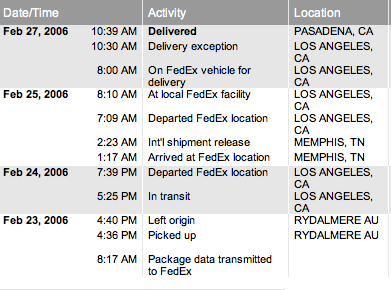
These quicky cards are from some place I found on the Net, clickbusinesscards.com. Use their little web design GUI for 10 minutes, insert 35 bucks via Visa and I had cards being shipped to me. I get them in a matter of days, but when I look at the Fedex tracking info (aka “travel blog” ), I see the cards came all the way from Australia! Across the Pacific! Through customs! Into Tennesee?
We live in a strange wonderful world where it’s cost-effective to have business cards made on the other side of the world.
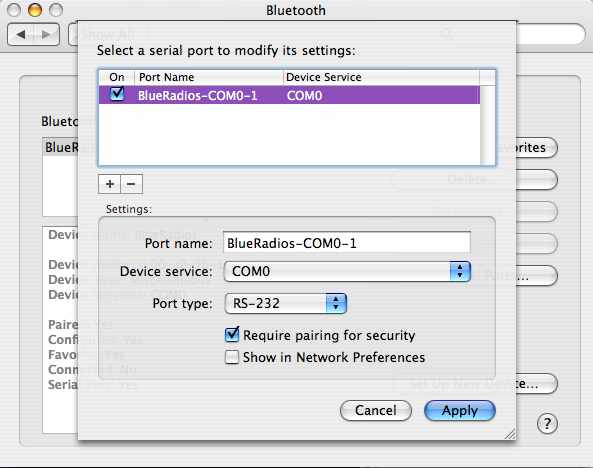
Setting up a Bluetooth serial adapter like the SparkFun BlueSMiRF isn’t very hard, but not very intuitive.
Bluetooth supports many “profiles” for doing various things (phone headset, address book syncing, file exchange, etc.) One of these profiles is the “COM” profile and is a simple serial port: raw binary data transmit and receive. That’s the profile these Bluetooth serial adapters speak. All Bluetooth stacks on computers appear to support the COM profile.
The SparkFun BlueSMiRF module speaks only the COM profile and when powered on and set up, looks just like a normal serial port to software. In truth it looks a little like a modem, because you can escape into a “command mode” that has an AT-compatible configuration language.
Unfortunately, many of the comments on these blogs don’t quite get the reason for hacking the Roomba in this way. (many “what’s the point?” comments) It’s not to make Roomba a better vacuum cleaner or to make it into a fully-fledged autonomous robot. It’s to bring the fun of robots into your household very cheaply. If you already have a Roomba or don’t mind spending ~$160 for one, you can easily hook it up to your computer and have real live Logo with a real live ‘turtle’. Or make it dance. Or just play around with it.
It’s not often we can write programs that effect the real world.
And if none of that helps, just think of it more as a computer-controlled RC car rather than a vacuum cleaner or robot.
As mentioned previously, I’ve started on a library to make Roomba-to-host-computer interfacing easier. This is the zeroth release of such a library.
The goals of this library are:
provide full access to the entire Roomba SCI protocol
provide a set of higher-level functionality on top of the SCI protocol
create a library that is as cross-platform as possible
provide interfaces to high-level languages/environments like Java, Flash, Processing, Max/MSP, etc.
allow someone who’s not an expert programmer utilize a rapid development environment like Processing to quickly manipulate the Roomba.
Java was chosen as a language, since the RXTX serial library seems well-developed on many platforms and has been tested thouroughly in Processing. Java also has good network connectivity, making it possible to create a net-to-serial adapter for the other languages.
RoombaComm In Use
In both Java and Processing, usage is very similar. Here is an example in Processing, which also forms the core of one of the Java examples:
If all goes well with the above, you should see and hear something like this:
The API functions used above allow for a very Logo-like programming experience. The API has also more detailed commands, including the ability to read the Roomba’s sensors. As there is no documentation, see the examples and source for now.
Expect a new version of this API with more examples and documentation within a week or so.
They work well and were easier to create than the Roomba Serial Interface. Unfortunately, “bluetooth as serial port” on computers seems a little raw. This is both for PC and Mac, though the Mac seems to be a bit more intelligent about it, perhaps because of its Unix core.
It’s pretty cool being able to drive the Roomba around wirelessly.
All of these are too expensive for practical ubicomp stuff. The BlueSMiRF is the cheapest overall, but doesn’t give you IP connectivity. The cheapest IP solution is the frankensteinian concoction of a SitePlayer and pocket AP. Not exactly as plug-and-play as something like the Wi-ME.
But, what about power concerns:
BlueSMiRF
5VDC @ 48mA, can be reduced to 2mA with config tweak
Digi Connect ME
3.3VDC @ 250 mA typical
Digi Connect Wi-ME
3.3VDC @ 400 mA max
Lantronix XPort
3.3VDC @ 267 mA nominal
Lantronix WiPort
3.3VDC @ 460 mA peak (388mA avg @ max data rate)
Asus WL-330 pocket AP
5V @ 680mA
Netgear WGR-101 pocket AP
??? 5V @ 2A power supply
Dlink pocket AP
??? probably similar to netgear
Obviously, BlueSMiRF wins at power consumption too. But jeez, I want my gizmo to have an IP address! None of the WiFi solutions above are efficient enough to run long on a battery. I wish someone would make available these custom WiFi chipsets that are coming out in phones and things like the Nintendo DS.