I’ve been exploring various types of gearmotors. DC motors by themselves spin too fast and have low torque. Gearmotors are motors with a gearbox that slows down the high speed of the motor and produces higher torque. Most gearmotors are pretty expensive though. I want a really cheap, almost throw-away, source of gearmotors. It turns out cheap servos can be made into continuous rotation gearmotors.
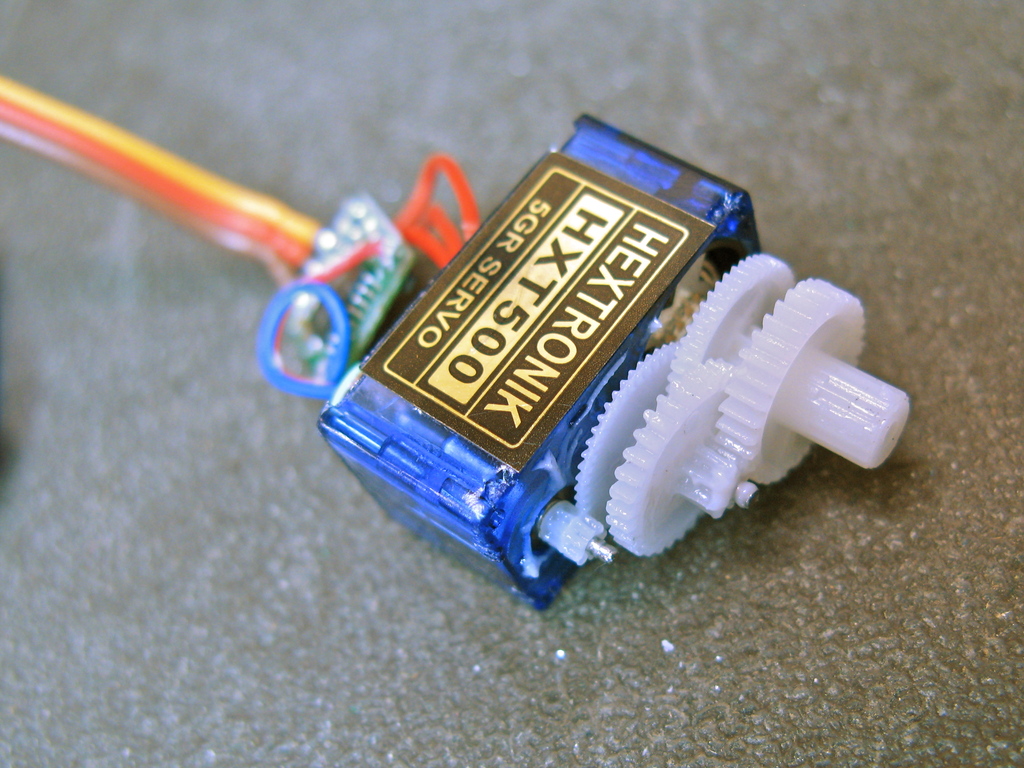
Modding servos for continuous rotation is not a new hack. You can find many examples of it. You can even buy a nice continuous servo made by Parallax. But I wanted a micro servo version. I’ve been getting cheap servo motors from Hobby City, and they have several super-tiny servos for less than $4. The ones I use here are the Hextronic HXT500 available for $3.49 each.
Here’s how to modify one of those servos to make it into a tiny little gearmotor.
How it works
Servos have a pulse input that specifies what angle the servo should be positioned at. Physically, servos contain a DC motor with a gear train, a potentiometer connected to the output shaft, and control electronics that reads the position of the shaft with the pot. The control electronics compare the commanded angle and compare it to the angle read by the potentiometer, and then proportionally controls the motor’s speed depending on how close the shaft’s position is to where the servo is being instructed. By removing the pot from this loop and inserting two fixed resistors of equal value, the servo will now drive the motor continuously either forward or reverse, with a speed proportional to how far away the commanded angle is from the mid-point.
Take apart the servo.
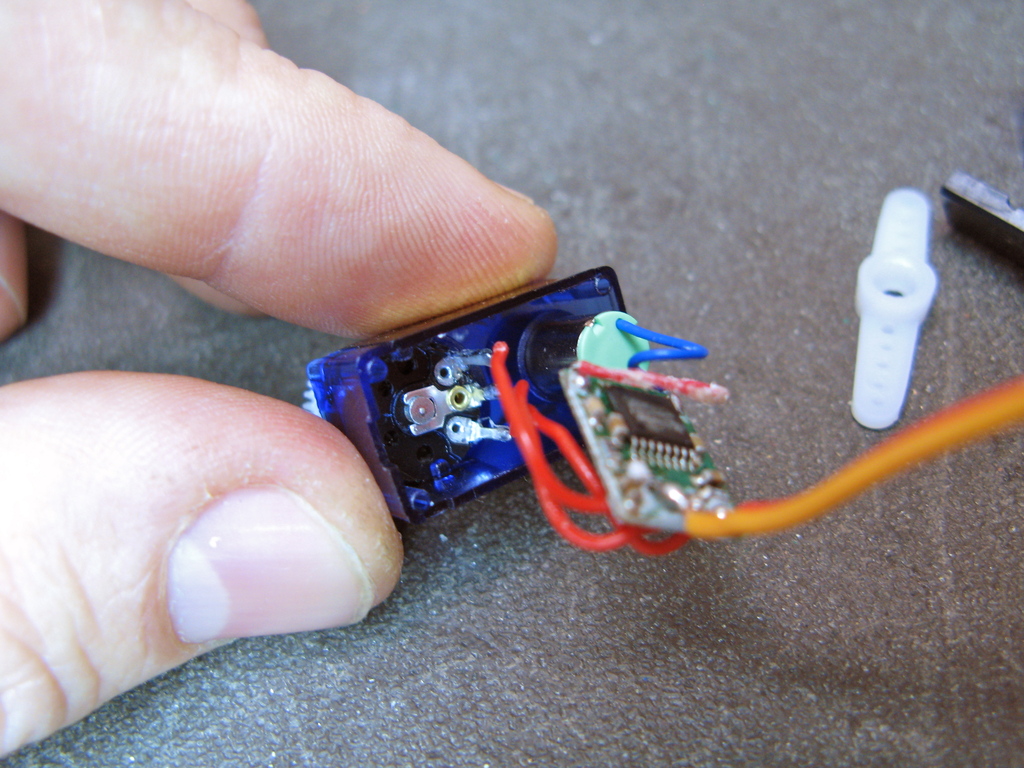
These servos have a case made of three pieces of plastic, press-fit together. You can use a small blade screwdriver or similar thin wedge to separate the pieces. From the top you can pull off all the gears (note which ones go where). From the bottom, you can access the servo’s circuit board.
(click on any of the images to enlarge)
 |
 |
 |
Remove the mechanical stops
The servo’s shaft (which is also the potentiometer shaft) has mechanical stops to prevent it from rotating too much. You want to remove these. On these servos there are two stops: one is a metal bit at the base of the shaft that can easily be bent and removed with needle-nose pliers, the other is a little plastic nub on the top case which can be snipped off with diagonal cutters.

|

|

|
Replace the potentiometer with fixed resistors
The pot in the servo is 5k. You want to replace it with two fixed resistors that add up to about 5k. I used two 2.2k resistors. I’ve also used to 2.7k in another servo. Unsolder the three wires from the servo’s potentiometer, and solder them to the two resistors. To keep this new assembly from shorting against the existing servo circuitry, tape it up, or like here, slip a bit of heat-shrink tubing over it. Then tuck it and the rest of the electronics back in the servo case and put it back together!

|

|

|
Using it with Arduino and SoftwareServo library
The sketch in the video is a real simple one that uses the Software Servo library on the Arduino Playground. On the Playground, it’s still called just “Servo”, which causes some conflict with modern Arduino. I couldn’t find a renamed version, so below is the renamed version, called “SoftwareServo”.
The SoftwareServo library is great because it lets you use any digital I/O pin as a servo output, let’s you configure the parameters of different servos, and takes an 0-180 degree angle to control the servos.
The sketch used in my tests are packed up in the zipfile SoftwareServoKnob.zip, and contains everything needed to play with servos using the SoftwareServo lib. Just unzip it and open the SoftwareServoKnob.pde file in Arduino. The files in the zip are:
– SoftwareServoKnob.pde — the sketch
– SoftwareServo.h — the library header file
– SoftwareServo.cpp — the library code file
How to “center” a continuous servo in software
One thing you’ll notice after using one of these continuous servos is that sending an angle of 90 degrees should stop the servo from spinning, but doesn’t. This is because the two fixed resistors added aren’t exactly the same value. This means that one servo might have a “zero” point at 82 degrees and another at 91 degrees. This is a pain to keep track of and is why the Parallax continuous servo contains a small trimpot that lets you adjust the zero point.
With the SoftwareServo library you can get back to having 90 degrees be the zero by adjusting the “maximumPulse” value for each servo. Create a sketch that changes the value of it with “servo1.setMaximumPulse(value)” across a range until you find a value that stops the motor when set to 90 degrees. The default value for maximumPulse is 2400, varying it between 2100 and 2700 should be enough to find the value that works for a particular servo. Remember that value (maybe write it on the bottom of the servo), use that value to setMaximumPulse on setup, and you’ve got a reversible DC gearmotor for less than $4.
Here is the link to a few pictures. Thanks for taking a look.
The only solution I see is to drill a hole above the potentiometer or to remove it some how from the bottom, which would be hard because its secured using some sort of adhesive.
Any advice is appreciated.
http://imgur.com/a/rpkfH
Hi Austin,
If you could upload photos of what you’re seeing to imgur.com, I might be able to give some pointers.
I’ve also found these tiny cheap servos to be annoyingly nonstandard over the years. It should be possible to do the mod, just might have to approach things a bit differently.
Thanks for the tutorial! I have to modify 36 of these little things for continuous rotation for a project I’m doing in my digital electronics class and this page gave me some hope.
But, I have ran into a problem. I purchased the micro servos you used in your demonstration (the HXT500), but when I too apart the gear box i found solid plastic, making it impossible to get to the mechanical stops on the potentiometer. I’m not sure how to include a picture, but the best i can describe it is that there are just 3 rods sticking out of the plastic and the top of the pot is inaccessible. I’m not sure if they changed the design of the model since you made this or what, but i’m at a loss as to what to do. Any help you could offer would be great.
Thanks for your time,
-Austin
Hmm, I’m not sure. Maybe a wiring problem?
Hey thanks for a great tutorial on how to do this…. I did it…. and the servo is moving only in one direction….. any idea why is this happening?
Thanks
Hi Jake,
It really depends on the servo. On some you can do as you describe. But in many of these tiny cheap servos, the pot shaft is integral to the gearing and can’t be removed easily.
Why could’t you glue the shaft of the pot and take the gear out or glue the shaft and cut the rest of the shaft off completely?
Hi Roi,
In all the servos I’ve taken apart, they all use very similar position-sensing potentiometer, and always 5k ohms. If you want to test that, you can measure the value of the pot yourself with a multimeter by unsoldering it from the rest of the servo circuit and measure the resistance across the outer legs of the pot.
I would be more concerned that since that’s such a tiny servo, it’ll be hard to solder to. You might want to get a magnifying glass! :-)
Hello!
I have enjoyed very much this great DIY page, about turning an hxt-500 into a continuous servo.
I tried it myself and it worked very nice!
Lately, i have an application that requires an even smaller and lighter continuous servos.
I have a question: i found this servo, which weighs half of the hxt-500 (that is 2.5 grams), it looks from the outside, very similar to the hxt-500, here is a link to that servo:
http://www.hobbyking.com/hobbyking/store/uh_viewItem.asp?idProduct=3714
My question is: Do you think it would be just as possible to turn this smaller one, into a continuous servo? Do you think that mechanically i need to follow the same steps and mostly unclear to me is: Do you think i should use the same resistors, as you used with the hxt-500? How did you find out, with the hxt-500, that you need a certain type of resistors and not others?
Thanks a lot,
Roi Neustadt.
Hi Fabio,
I wanted to do that, but on the servos I was using, the pot shaft was part of the gearing mechanism of the servo. I couldn’t remove or freeze the pot without messing up the gearing. So I left it in place and added resistors. :)
Hi, thank you for the smart tut!
Simple question: why not glueing the pot in its central position, instead of replacing it by single resistors?
Bye
Fabio (from Italy)