
spooky arduino projectsarduino class merit badge

The notes for the fourth and final class are up on the Spooky Arduino class page. At the end of the class, Mark of Machine Project bestowed upon each of the students a merit badge. It was great. Click above for a larger view of the badge.

Arduino MIDI Drum Kit and Spooky Sound Trigger

Here’s a quick project using techniques from this week’s class that turns an Arduino board and a few buttons and piezos into a MIDI drum kit or scary sound trigger. Hide piezo sensors around the house during your Halloween party to trigger scary sounds when people walk around!

Hardware

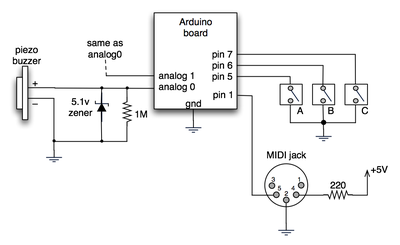
The hardware is an Arduino board with a MIDI jack, a few buttons, and two piezos attached to it. It runs off of a 9V battery.
arduino midi schematic

(Note: depending on what kind of MIDI connector you’re usign (jack or cut-off cable), you may need to swap the connections to MIDI pins 4 & 5).

For the piezo input, the 1M resistor is to bleed off the voltage generated by the piezo when it is struck. The 5.1v zener diode is there to insure any large voltages don’t make it into the Arduino and blow it out.

Arduino code

The code has a few tricks that may not be immediately obvious. First is that to implement a MIDI interface, all you really need is the ability to send serial data at 31,250 bps. This is easily done with “Serial.begin(31250)“. Once that is done, a complete three-byte MIDI note-on message can be sent with three “Serial.print(val,BYTE)” commands.

The next tricky bit is that the switches in the above schematic don’t need pull-up resistors. This is because the internal pull-ups in Arduino’s AVR chip are turned on with a “digitalWrite(pin,HIGH)“. This may seem counter-intuitive, doing a digitalWrite() on an input pin, but it’s how the AVR works. The benefit is that you no longer need a resistor to +5V and the effort to wire up each additional button is much lower.

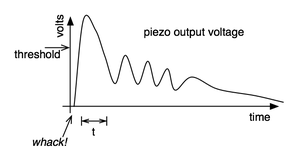
The final trick is measuring impact force on a piezo. When piezo elements are struck, their output voltage rings, sort of like a bell. Kind of like this:
piezo whack!

By measuring the time it takes for that first big jolt to cross a threshold, you can get an idea as how big the force was. In the code this is represented by reading the analog value and if it’s over the threshold, wait until it drops down again, counting all the while. When I’ve done this before, I used an input opamp to convert the analog signal to digital (thus doing thresholding in the analog domain) and then used interrupts to get very accurate force measurements.

Arduino code: midi_drum_kit

References

95 Responses to “Spooky Arduino Projects #4 - Musical Arduino”

Wich program do you use to make those electronic diagrams?. I asked this in the last post but I suppose you didn’t read it. I beg you to answer me. Thank you so much.

Hi Coli,
Sorry about that. The program I use is OmniGraffle. It’s pretty much the Mac answer to Visio (except so much nicer looking).

Drawing schematics with OmniGraffle is time consuming though and is only usable for very simple schematics. When I’m drawing schematics “for real”, I use Eagle which is one of the best schematic drawing programs out there (and free for personal use!).

Thank you again! I’ll try both Ommigraffle and Eagle. And congrats for your arduino tutorials =)

Looks gr8!

Can you connect the board to a computer and feed the midi to a sequencer software (Cubase)?

(see also http://createdigitalmusic.com/2006/10/30/diy-midi-drum-triggers-with-arduino-midi-over-usb/)

eric.b: yes, definitely. In fact, in the video, the sampler I’m triggering is Impulse in Ableton Live and the track was recording everything I played.

Nice!
And how did you interfaced with ableton Live?

To interface to Live, I have a MIDI interface for my Mac. There are lots of different ones out there. The particular one I used is also a MIDI keyboard. It’s the Korg microKONTROL.

So Arduino has a midi OUT which connects to the microKontrol midi IN, and the midi OUT of the microKontrol goes into your MAC that runs ableton LIVE?

That’s the conceptual signal flow, yes. The Arduino is plugged into the microKontrol via a MIDI cable and the microKontrol is plugged into the Mac via a USB cable. The microKontrol is a USB-to-MIDI interface (the Mac doesn’t have a MIDI port built in)

[…] Found this whilst trawling through some websites looking for ways to make my sound applet. http://todbot.com/blog/2006/10/29/spooky-arduino-projects-4-and-musical-arduino/ - pretty cool stuff huh!! […]

Hi,
Is it possible to connect the Arduino directly into a Windows based PC to trigger samples?

Hi lpearce,
It’s definitely possible. There’s a few different ways to go about it, but all hinge on having some program on the PC that listens to a serial port (which is what Arduino’s USB port looks like to the computer) and then triggers samples.

If you use Max/MSP, Pd, or similar algorithmic music composition tools, they already have built into them the ability to listen to serial devices. If you just want to trigger samples, you can use Processing to read the serial port and trigger sounds directly, as shown in the code in the Spooky Arduino Projects notes.

There may even be some serial-to-MIDI driver programs for the PC you could run that would make the Arduino’s serial look like a MIDI port to any PC MIDI program. I wrote a similar program for the Mac and a serial-connected Roomba called RoombaMidi. I don’t know enough about virtual serial ports on the PC to make it work there though.

Hi there, im new to elecronics, but the idea of making drum triggers is superb, could you give me an idiot guide to the components that i need, i want to go to my local maplins and have a crack at it.
thanks for your help

[…] Recently I acquired an Arduino board.  This nifty little gadget is like Lego Mindstorms for grown-ups:  a dirt-cheap microcontroller system you can program from the comfort of your home computer without needing expensive extra hardware.  It’s very hacker-friendly, and folks have used them to make all kinds of nifty things, from a MIDI drum kit to a virtual chainsaw.  I’ve already got all kinds of wacked-out projects in the works (perhaps even my Internet-controlled automatic flush toilet?)  Of course, in order to actually build anything, I need some electronic components, and in times past, when such a need arose, I would gravitate to Radio Shack. […]

What a great idea, especially with the piezo buzzers!

I was wondering what voltage piezos you used in conjunction with the 5.1v zener diode and 1M resistor and what is the limit of the voltage for the analog inputs on the Arduino is?

Cheers,

Mo

Hi Mo,
The piezos are just whatever I had laying around or the ones at Radio Shack. That is, they’re the most common, cheapest piezos. These piezos can produce voltages into the hundreds of volts depending on how hard you hit them. The actual value of the voltage they produce isn’t important for the applications presented here.

The Arduino inputs, like most all microcontrollers, are limited to between 0V and 5V. If you get above that you may damage the inputs. In reality, all microcontrollers have protection diodes to bleed off voltages that are too above or below that range so you don’t really need the 5.1V zener diode. I like to add it just in case.

Hi, I’m so happy to see this great project!
Should I use a 9v battery instead of 5v usb connection?
It is very picky to control the piezo output voltage.
I’m using it with an analogue multiplexer. :D

Hi Enok,
A 9V battery should work fine. It’ll probably last for around 10 hours of continuous use.

I’m not sure which analog multiplexer works that you’re using. It must have really high input impedance (around 10 Mohms) so you can sense the piezo’s output voltage.

[…] MIDI Output (from ITP physcomp labs) and from Spooky Arduino (21)森  […]

hi, how would you compare the arduino based with the commercial ones like vdrums or maybe the ones from edrum(also a diy)

Hi Melvin,
Any professional product like the Vdrums will be vastly superior. This is mostly a toy. It’s an afternoon project to play with. I’ve not seen the edrums diy so I don’t know if it’s as much of a toy as the Arduino project above, of it it’s actually designed to be a real MIDI drum brain.

How easy is it to send MIDI out from Arduino to a PC through the standard USB interface? Would Windows-based MIDI software see the Arduino as a MIDI interface if it’s sending MIDI formatted messages over serial?

Hi jbc,
In short, probably not.

The Arduino’s USB interface appears as a virtual serial port to your PC, not a MIDI interface. This means that most music software won’t see the Arduino as a MIDI device. I think there are some programs like Max/MSP that can treat a serial port as a MIDI device but it’s not a standard practice. There might also be a serial-to-MIDI converter program you could run on your PC to create a fake MIDI interface. I’ve done this on the Mac but I’ve no idea how to do it on Windows. If you find such a program, let me know!

cool - what software on the Mac did you use?

jbc,
For Mac OS X, I built a Roomba-to-MIDI driver that appeared as a virtual MIDI interface to standard MIDI software on the Mac. Coding-wise, talking to a Roomba and talking to an Arduino is very similar. I had planned on slightly reworking the code for Arduino but never got around to it.

hi there..
i juz wanna request for a diagram…
can u interface piezo sensor with plastation controller? i try it once for drummania game but it doesnt react that fast… maybe you can help built it from scratch… i am a noob in electronics…
sorry for my bad english
goodluck to you
thanks

Can you Todbot or anybody here tell me how many sensors or piezos this project will take? I see five in the video. Can it take 8 without serious modifications? And Todbot, why do you think this is just a toy? A simple velocity sensitive, battery powered trigger-to-midi converter is a great tool! I was thinking about trying this.

Hi frog,

The Arduino has 6 analog input pins, so you can have 6 piezo pads. The Arduino also has 14 digital input/output pins (one of which must be used for MIDI out), so you can have at most 13 buttons.

I consider it a toy because I whipped it up in an afternoon. Also, the piezo velocity-sensitivity measurement as implemented isn’t very accurate. To get it more accurate would require some input buffers added to the hardware and better access to interrupts.

But yes, you can pretty easily make a portable battery powered 19-input trigger-to-MIDI out of an Arduino and it would work reliably and be a lot of fun.

Dang, fast reply! So 6 is nice. Um, just how inaccurate is it?

(heh. I get email when someone makes a comment)
I didn’t quantify the lack of accuracy, except to note that it was far rougher than a similar system I built in ‘90. :)

I’m sure if you played around with the code you could make it more accurate. Poke around on the Arduino site & forums to see if anyone else is working on trigger-to-MIDI code. Chances are someone is and they probably have a more elegant solution than my quick hack.

Hi and congratulation,
You were speaking about sending midi through the USB flow… and thank you for the link toward the MAC convertor ;)
But i m wondering if there is not a problem of bandrate …. it s not 9600 in midi message, but is the convertor will understand it ?

Hi,
The converter program I mentioned above doesn’t care about the baud rate (which you’re right, MIDI is at 31250 bps and most Arduino sketches are at 9600), because it’s just receiving data from one part of the computer’s OS and sending it to another. The baud rate difference would only be a problem if you’re trying to send a lot of MIDI (or very accurately-timed MIDI) over your 9600 baud link.

Hey,
I was wondering if this board would support enough triggers to make a midi xylophone. (probably around 60) If not what would be an alternate solution?

Hey Tod, thanks so much for this tutorial. I was wondering though: you say in the PDF “there are much faster ways of watching inputs than loops with analogRead().” What are those faster ways? Can it be done on the Arduino?

Hi Tyler,

The two common ways of quickly and reliably reading analog inputs on microcontrollers is 1) have a periodic timer interrupt that reads the input, or 2) have an interrupt that is triggered when the analog-to-digital converter completes its conversion. When an interrupt fires, it runs a bit of code that’s separate from your normal main loop. Recent versions of Arduino provide easy access to some types of interrupts, but I’ve not played with them much yet. Also, the Arduino IDE doesn’t stop you from using normal AVR C code to do your own interrupts (though you do have to be knowledgeable about how the Arduino code sets up the AVR chip on the Arduino board)

thanks a lot for this page, tod. i think i found one error in your schematic. pins 4 & 5 on the midi connector seem to be swapped. in making this simpler version of what you’ve got as a test of my Nintendo game pad library, i noticed that everything seemed to be working but my midi-usb interface wasn’t getting the messages. i found another pinout with those pins swapped and it worked correctly after that. thanks again and good luck.

hi tod,

i noticed that your noteOn() and noteOff() are the same. on this page, it looks like your (0×80 | (channel

Sorry, you can ignore that last comment - I should’ve kept reading down below where it says that a noteon with a velocity of 0 is the same as a noteoff. I’ll stop now. Sorry again, but I’m on a roll right now. Thanks for the insipiration.

Hi Rob,

About the MIDI jack and pins 4 & 5: it depends on whether or not you’re talking about a MIDI cable or a MIDI jack. I was following what other Arduino users have done as discussed here and here and I think perhaps we may’ve all be using a cut off MIDI cable instead of a proper MIDI jack.

As for noteOn() and noteOff(), yeah it’s a hack, and a hold-over from when I first started doing MIDI programming back in the ’90s. Some MIDI devices didn’t respond correctly to the “note off” command but did to “note on with zero velocity”. It makes for confusing code and I should change it (or at least document it).

Good luck, and when you do a blog post about your creation, please link to it here in the comments, or post something about it in the Arduino forums. Others can learn from the additions/advances you make.

Thanks again for the info, Tod. Here are the links:

The NES joystick library for Arduino
An NES joystick MIDI controller
Another MIDI controller made from a kid’s toy

Fun stuff. Thanks again!
Rob

Any idea where to get the MIDI Jack from online? I tried a few google searches, but no luck, nor from the component sites listed here. Thanks in advance!

Hi Ben,
If you’re looking for a “midi jack” on Jameco or Digikey, you probably won’t find it. The real name is something obscure like “5-pin 180º DIN jack receptacle with female sockets”. The cheapest/easiest might be just to get a “PC/AT keyboard extender cable” or even just a MIDI cable and cut them in two. I’ve done that several times.

If you want a proper jack you can solder to, here’s one from Jameco.

Tod, thanks so so much for the tutorial (and all the stuff on your site).

You won’t believe how frustrated I’ve been tonight. I went over my connections a trillion times, but could not understand why I wasn’t getting any midi out from my Arduino……until I read Rob’s post about swapping pins 4 and 5 - which I did, and now everything is working perfect.

Thanks again, and thanks Rob! :)

I’ll send you info on my project when I’m done.

Oh, and btw: the NYU Computer Store sells the “midi jacks” as “5 pin DIN connectors” for $1.45.

Ben: just remember to swap pins 4 and 5…

Hi, great post. I wrote a Mac OS X application that creates a virtual MIDI instrument from Arduino serial output. This eliminates the need for the MIDI module as you described. I made an electronic drum kit out of it. See: http://code.google.com/p/ardrumo/ for details.

Thanks a lot for the tutorials. This opensource is indeed exiting and revolutionary.

Anyways, I’m new to microcontrollers and arduino, (have a little coding experience though)

You mention input buffers for better control of the piezos. I found some information about loading down the piezos with several 10Meg resisters and then buffering the output voltage with an op amp such as the U1-A.

I was wondering if this would work, and, if it would help anyone, to link to the information…

http://www.musicfromouterspace.com/analogsynth/SOUNDLABMINISYNTH/drum_trigger.html

Hi there,
Thanks for your info!
I’m building a led-system into my drumkit and your trigger-diagram helped me to generate a nice input for my microprocessor. About your analog inputs, you can link buttons parallel with several different resistors and use just one analog input to read which button is pressed. By using for instance 1k, 2k, 4k, and 8k, you can read exactly what buttons are pressed using just one input.

byebye

I may be wrong but there is something in your .pde code which is funny:

You use
midiMsg( (0×80 | (channel<<4)), note, velocity);
for noteOn and noteOff messages.

In fact, it should be 0×80 for noteOff, and 0×90 for noteOn.
And, instead of (channel<<4), you should use (channel-1).

Interestingly, your code works because as you are only using channel 1, 0×80 | (channel<<4)) gives 0×90 (which is the code for noteOn).
And so for noteOff, you send a noteOn with a velocity of 0 (which is interpreted as a noteOff by all synths, but is not exactly the same thing… as it is possible in MIDI to have a noteOff velocity).

Hi Patrick,
You are entirely correct. As I mention in the comments above, the “noteOff as noteOn with zero velocity” is not a bug but a purposeful lazy hack that I’ve been doing for a long time and should probably stop now that I’ve received multiple comments on it. :)

very good stuff todbot.
comments of other users (willem & mschaff) are very interesting, it gave me new idea to clone the monome with velocity pads (!).
yes, u have to improve your midi langage, this will give you more possibilities.

Excellent stuff ! managed to adapt it to take 5 peizos and finally got it working ( as i have no previous programming experience). However i noticed when monitoring the incomind midi signal that there are often more note off messages than note on,and i cant figure this out, this was also the case before i expanded the code to include 5 piezos. Do you know why this happens and if it can be sorted ?

Hi Daniels,
I’ve not seen your code, so I can’t tell you for sure, but I bet it’s a misplaced curly-brace for the initial “if()” statement.

[…] MIDI OUT: read a piezo and send midi notes tutorial […]

[…] DIY Arduino MIDI Drum Kit [link] […]

http://code.google.com/p/s2midi/ or here http://www.memeteam.net/ has a serial to midi translator app for windows just fyi, no reply required

hey man, great tutorial, I was wonderng if you had any insite into how to do the oposite, taking midi data (a midi file) and getting it to control some external device (using the Arduino)

I’m working on a similar setup but using a pic 16f690 instead. I found a PC serial midi driver that works great so far:
http://www.roland.com/products/en/_support/dld.cfm?iCncd=724&ln=en&SearchBy=RcId&dst=P&iRcId=0000010777&dsp=1
The only trick is that you should set the serial port speed to 38400 instead of the midi spec speed of 31250. Apparently due to integer boundary timing :) Either way, I hooked up using the standard serial port and the few midi monitor program I tried saw the driver and got the midi messages exactly as sent.

Thanks for the nice video and project todbot!

Thanks to mschaff for good details on constructing cheap pads.

My question is how many levels of velocity can this code/hardware accurately measure? Talking with an audio buddy, he didn’t think software would have more than 3-7 velocity levels for any given drum channel. If this simple hardware can achieve that then I’d be more than satisfied since I prefer simple hardware (being a software person) and am not a drummer.

Hey again. :) I’m starting to make some great progress on trying this out. I built a full kick pedal with the sensor integrated…

check it out: http://somesoundswelike.com

I’m running into the double or triple triggering problem… I have a few ideas about how to defeat it, but if you have any insights, I’m all ears.

thanks as always! your content is freakin’ awesome, and stays awesome for a long time. :)
-steve

great tutorial. I am trying to do the same thing for learning purpose. I’m a programmer but I don’t know anything about electronic.
I stopped by radioshack last night and they have so many different piezos that I didn’t know which ones to buy. Is there a ref number on the one you stripped down?

I was also looking into the labjack U3 from http://www.labjack.com/labjack_u3.php?prodId=25

Do you think this would work?

Thanks for your time
-David

Hi David,
That LabJack you mention is mostly for data collection in labs, I’m not sure how well it would work in a real-time environment. That is, it contains no intelligence, just inputs & outputs. The Arduino contains a small computer that can act on its inputs and twiddle its outputs

As for which piezos, generally the rule is “get the cheapest”. You want to get “piezo elements” and not “piezo buzzers”. The latter contain driver circuitry to make noise. I believe the piezo elements from Radio Shack I’ve had success with is 273-073.

fantastic tutorial :] just wondering if there is a way to add on additional analog inputs? could they perhaps piggyback/cascade from one to another board?
thanks again for sharing your info..
Cheers
-Jake

Hi Jake,
There are analog multiplexers that let you switch many analog inputs to one. (pick which input to read, read it, pick next input, read it, etc.) This doesn’t truly expand the number of inputs you have, but you usually don’t need to truly read each input simultaneously.

There are also many I2C analog-to-digital (A/D) converter chips out there that are pretty cheap.

It works!!
I started to program this MIDI interface a long time ago, and I had problems reading the piezo when played fast (some notes were missing), and then I found your little “hack” that saved my life!
Well, the only problem I’m having right now is that there seems to be a little lag in the analog-to-digital conversion (very annoying), long enough to make it unplayable (switches don’s have lag).
In the video I see you don’t have any lag at all, and I wonder if my problem is due to my version of the Arduino board: Arduino NG rev.c

Any ideas?

Thanks!
Bran

Hi Bran,
The lag is likely not due to the A/D or the version of Arduino you have (I originally did this on an NG I think)

More likely (if you’re using my code above), it’s the part of the code that attempts to determine “velocity” of the hit on the piezo. Instead what you might want to try is just measure any hit at all. (like in the KnockSensor Tutorial)

If you don’t get any lag with that, it’s definitely an issue with the velocity-determining code (which is a real hack on my part). If it’s not that, be sure you have that 1M resistor across the piezo. That’s needed or the piezo just builds up a charge on it and you can’t measure anything useful, but could perhaps show up as a sort of ‘lag’.

(and congratulations on it working! :)

Hi, I’ve tried the simple way, and I get almost the same lag:

val = analogRead(piezo);
if (val > threshold)
{ noteOn(0×90,note,val/8);
delay(1);
noteOn(0×80,note,0×00); }

With this code I also get double notes on one stroke, so I tried this other way:

val = analogRead(piezo);
if (val > threshold)
{ if (already_playing==0)
{ noteOn(0×90,note,val/8);
already_playing=1; }
} else
{ if (already_playing==1)
{ noteOn(0×80,note,0×00);
already_playing=0;}
}
delay(1);

This eliminates most of the double notes, but the annoying lag is still there… :(

I’m mostly on the side that it has to do with my board and the analog inputs, because the digital inputs have no lag at all.

Anyone here with the same board (Arduino NG) have succeeded with no lag?

Thanks,
Bran

Great project todbot,
In relation to those who were inquiring about more inputs, I am wondering if this might be possible using triggers set up in a matrix fashion similar to the way keyboards work. I know this wont be possible with the piezos but do you know if might work with switches on the digital inputs ?

[k]

Hi keet,
That’s a really interesting idea, having the piezos in a matrix. My first instinct is that it’s not possible, because the piezo signal is analog (not digital) or because the loading of the other elements would make it hard to read just one.
But some more thought and some experiments would be warranted to say for sure.

Greetings todbot!
I recently got an Arduino and have used your projects quite a bit already. So first off, thanks! Very useful stuff.

I’m having an issue with one of my fiddling projects though and I think this particular project may help me fix my issue. So, here’s my questions for you:

In the following code;

noteOn(1,note_crash, t*2);
delay(t);
noteOff(1,note_crash,0);

What happens if you punch one of the buttons, or hit the high-hat, _during the delay_ between noteOn and noteOff? Does that instrument play as well? Overlapped with the current instrument, right after the current one finishes, not at all?

I watched the video a couple times, but just can’t quite figure it out that way. I also don’t have any midi anything around here to just try building the thing myself.

Thanks in advance,
Del

Hi Del,
You’re very perceptive. If you hit a button or piezo during the delay(), it won’t be read. I probably shouldn’t have done the delay like that. If you want, you should be able to make the delay small and constant (e.g. “delay(10)”). If you’ve set your MIDI device to “drum” or “trigger” mode then it shouldn’t matter how long the note is held for. But you should still send a note off to avoid the stuck-note issue of some MIDI modules.

Thanks for the answer!
This is exactly the problem I’m having with a different project. While being completely new to this microcontroller thing, I’m trying to figure out how to make the Arduino recognize/respond to button input during the (heavily delayed) loop. The buttons are speed up/down and mode left/right, changing the speed and sequence of a wad of LEDs (my newbie learning project).

Fun stuff, I’m used to writing PHP, and have never had to deal with concurrent events in my code. Kind of a waker-upper to not have a threading daemon backing things up :)

Yeah it’s tough with microcontrollers because you can’t spawn a new thread or process to take care of stuff.

There are two ways to go about it. One way is to use interrupts. This is where you associate some external event with a chunk of code. Arduino supports a type of interrupt, so that might work for you.

The other way is to remove all delay()s from your code and instead use millis() or many shorter delays() to check if enough time has passed. For instance, instead of doing this:

  doFirstThing();
  delay(1000);     // wait for a second
  checkButtons();  // but now it's too late
  doSecondThing();

you can instead do something like this:

  doFirstThing();
  for( int t=0; t<1000; t++ ) {
    delay(1);       // wait just a little bit
    checkButtons(); // button resp. fast now!
  }
  doSecondThing();

or something like this:

  doFirstThing();
  int starttime = millis();
  while( (millis() - starttime) < 1000 ) {
    checkButtons();
  }
  doSecondThing();

Or better still, leave out the while altogether and check for needing to do an action each time through loop(). E.g. something like:

boolean thingHappening = false;
int startTime;

loop() {
if (someCondition) {
doFirstThing();
startTime = millis();
thingHappening = true;
}

if (thingHappening && ((millis() - startTime) >= 1000)) {
doSecondThing();
thingHappening = false;
}
}

The advantage of a “state machine” scheme like this is that you can have more than one thing happening at the same time.

I’m not sure about this but I think the Arduino code can lose characters received on the serial port during calls to delay() which are too long. delay() is convenient for quick experiments but I think it’s usually better avoided the moment you want to do anything a little bit complex.

In the previous post I should really have said explicitly that the idea is that you can have a call to checkButtons() or whatever in each pass through loop().

I’ve been banging my head against the wall on the piezo double/triple trigger problem… still. :) I used tom igoe’s sensor reading and charting technique and have something resembling actual science now.

please come take a look and leave a comment…
http://www.somesoundswelike.com/2008/02/02/diy-drum-triggers-reading-the-sensor-scientifically/

I’m thinking about the multi-sensor problem, too. Although, i think you could limit it to 4 concurrent sensor readings, since you typically only have 4 appendages that you can hit sensors with at any given moment… I dunno if that really helps the problem or not, but it’s something I’ve been thinking of.

Hello guys..
well.. Super! i’m looking for arduino exactly as a midi interface..but i want to use this with Live ableton…
Can u connect that ddirectly to live ableton?? without the minikorg?

Hi! You don’t need the minikorg. But you will need a hardware MIDI interface for your computer (~$40). Or you could run a converter program to convert the Arduino’s USB serial messages to internal MIDI messages. A few of these converter programs are mentioned above. Also, poke around the Arduino forums and you’ll find others.

[…] Spooky Arduino Projects #4 - MIDI Drum Triggers […]

[…] 1 - Code and software Link 2 - Video and wiring » Filed under Interaction Design by Mikko at 17:52. back to […]

so i managed to get an RBBB assembled (really bare bones board - check out http://moderndevice.com ) and working last night to the extent of sending midi out to a korg esx-1, just playing scales over several octaves… so challenge met halfway…

i’ve been reading the posts here and regarding the multiple ’strikes’ issue - i have to wonder if the key isn’t simply adding, as tod suggested in the original diagram - the diode and resistor to the signal path of each piezo… i’d be very interested in graphs showing the ringing effect with and without several grades of diode and resistor values.

also, what’s the response time of a power regulator ic? perhaps that may be used, or used in conjunction with a diode and/or resistor, to normalize the impacts even more… so that you don’t have issues associated with some strikes going so beyond your target threshold that even some of the rings qualify as additional hits as well.

and taking the analysis of the problem a step further… one could also investigate the properties of envelope generators of analogue drum machines which are particularly good at very sharp decay… you could apply an EG to each piezo and then you really would just be seeing one significant peak to be compared to your threshold.

You got it, Kris. The real trigger-to-MIDI converters have a per-input op-amp input state to condition the piezo input, very much like an envelope generator. Though I think their op-amp circuits are more like comparators that convert the piezo input to a on/off signal, where the ‘on’ duration indicates the velocity of the input strike.

I’ve made a drum-trigger with arduino, based on your project among others, and i solved some issues (as double/triple trigger on a note) just by using a peak-detector. Results are smoother than using a single piezo. A simple peak-detector is made with a diode, a capacitor and a dicharge resistor. I found some interesting info about this topic at Paia’s web:

http://www.paia.com/ProdArticles/drumsens.htm

This works by charging and discharging a capacitor (and using an op-amp after), so i think it’s not by “on” duration, but by the charge level of the capacitor when being discharged, so you can measure variable voltage on output. You can use a pot too, and then you can increase and decrease the threshold (sensivity) for a drumpad.

Keep rocking!

i had also recurring thoughts of ‘capacitor’… what if: you added a capacitor after the diode and resistor (both to bleed off more severe strikes), then, follow this algorithm, in your loop() — 1. take a reading of the voltage coming off the capacitor — 2. if it meets your ‘attack’ voltage, set a counter to zero — 3. while the voltage is greater than a ‘decay’ voltage, increment your counter and delay (by 1ms?) — 3a. if your counter is greater than some max value, break out of the while loop — 4. once out of the while loop, evaluate your counter versus the initial ‘attack’ voltage reading… the two together should give you some indication of how hard the piezo was struck as well as how long it took the capacitor to discharge i.e. how much energy was stored into it as a result of the strike velocity, and thus, you’ve got one velocity reading… obviously this adds some latency into evaluating each strike but depending on the type of capacitor used the discharge could happen very rapidly.

mm, just realized a required slight modification to the above algo — while in the while loop waiting for a ‘decay’ voltage, add an if statement to update the ‘attack’ voltage if you get a reading higher than the initial ‘attack’; this will account for cases where the ringing of the piezo is slightly delayed.

Hi Kris & Fabi, Yup, that algorithm you mention Kris is basically the one implemented in the original Arduino sketch above. The general term is “thresholding” or “comparator”. I found in my experiments that measuring the signal via thresholding was more reliable that measuring peak voltage for piezo signals.

That PAIA page linked by fabi is great and very instructive. It contains two very useful sub-circuits: a peak detector and a voltage buffer. In the Arduino circuit above, I was hoping the intrinsic capacitance and built-in diodes of the AVR’s input pins would be enough to act as peak detector. And that the high-impedence of the pins would not require the use of an op-amp buffer.

I think I used that very PAIA info when I built my senior EE project: “perc-a-lator”, a trigger-to-MIDI converter, back in 1992. (schematic here) I omitted the op-amp buffer that’s in the PAIA circuit because the microcontroller I used also had high input impedance and a fast A/D.

i intend to set up a few experiments this weekend, graph and compare what i get out of a zener versus a 200v peak inverse rectifier (in4003), both going to a 1mohm resistor and finally a capacitor… (i’ve got a theory about using a rectifier instead of a zener.)

have no idea what capacitor will work best… though i think i like the sound of ‘2.2µF 50V 20% Nonpolarized Electrolytic Capacitor 9,000Hz’.

as for the envelope detection/correction i’ll stick with doing it in my sketch and modify the heck out of a state machine to manage all 6 inputs.

i’ll post my findings when i’ve got ‘em! :)

so here’s my current arduino sketch to test trigger values/enveloping on all six analogue inputs in a state machine with no inner loops (other than the one to traverse all six inputs)…


int led = 13;

int env[] = {128,384,256};

byte s[6];
int i[6];
int v[6];
int t[6];
int x = 0;

void blink(boolean b)
{ digitalWrite(led,b ? HIGH : LOW);
}

void setup()
{ pinMode(led,OUTPUT);
  for(x = 0; x < 6; x++)
  { s[x] = 0;
    i[x] = 0;
    v[x] = 0;
    t[x] = 0;
  }
  Serial.begin(57600);
  Serial.println("----");
}

void loop()
{ for(x = 0; x  env[0])
      { s[x] = 1;
        t[x] = 0;
        blink(true);
      }
    }
    if(s[x] == 1)
    { i[x] = analogRead(x);
      if(i[x] > env[1])
      { s[x] = 2;
      }
      t[x]++;
    }
    if(s[x] == 2)
    { blink(true);
      Serial.print(x);
      Serial.print(";");
      Serial.print(i[x]);
      Serial.print(";");
      Serial.println(t[x]);
      i[x] = analogRead(x);
      v[x] = max(v[x],i[x]);
      t[x]++;
    }
    if(i[x] < env[2])
    { s[x] = 0;
      blink(false);
    }
    delayMicroseconds(1);
  }
}

Is there a midi module that i can use that is at a reasonable price range? roughly no more than $200 or less?

Hi Mike, yes, there are many MIDI adapters for your computer. Usually around $40 or so. For instance, there’s the M-Audio Uno that I’ve heard works well.

[…] zum Beispiel eine eigene LASER HARP nach dem Vorbild Jean Michelle Jarres zu bauen oder ein eigenes Trigger-Drumkit entwickeln. Die Möglichkeiten sind schier endlos, da jegliche Art von Sensoren und Aktoren […]

[…] zum Beispiel eine eigene LASER HARP nach dem Vorbild Jean Michelle Jarres zu bauen oder ein eigenes Trigger-Drumkit entwickeln. Die Möglichkeiten sind schier endlos, da jegliche Art von Sensoren und Aktoren […]

I’m currently building a midi controller to interact with ableton live and your project has helped a lot. I’ve got several pots all hooked up and working but I’m having problems with the coding for the buttons to trigger the clips in live. Have you done anything similar? Do you have any examples that might help?

Thank you in advanced.

Mark

Hi Mark,

Do you have the buttons hooked up exactly like the schematic I have above? I did a bit of trickiness with the buttons that is easy to miss. When hooking up buttons, you normally need a “pull-up” or “pull-down” resistor. See the Arduino Button tutorial for an example with a pull-up resistor. If you have some 1k to 10k resistors, try hooking them up as in that tutorial and see if that solves your problem.

The trickiness I did was to use the internal pull-up resistors that are part of the chip in Arduino. That’s what the:
digitalWrite(switchAPin, HIGH); // turn on internal pullup
line does and you need one per switch.

The other thing to realize is that when the switches are hooked up like this, they produce a LOW when pressed.

[…] Algumas inspira??es para este projeto: Ardrumo Spooky Arduino Projects #4 - Musical Arduino […]

Hi Tod,
thanks for the advice about using a MUX to “increase” the analogue inputs on the Arduino. I’d like to interface with MaxMsp but am struggling with the code. The piezo seems to trigger all the inputs on Arduino out of the MUX. Is there anyone who could offer advise on the code. Also, is there any schematics for interfacing an ADC to also increase piezo inputs by utilising the digital i/p on the Arduino.
Thanks

Something to say?