There’s been some confusion as to whether or not the DIY RGB orb presented in the last post was actually connected to a computer and receving color data from it. Here’s a video that more accurately depicts what’s going on and all the code used to create it.

Hardware

The hardware is just an Arduino board connected via USB to a laptop. The Arduino appears as a serial device to the computer. On the Arduino board, three LEDs (red,green,blue) are mounted directly to the Arduino board using a prototyping shield like this DIY one. The schematic is quite simple:
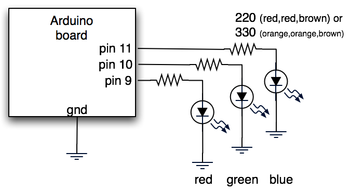
rgb_led_schematic.png

Arduino code

The code sketch running on the Arduino board is a slightly modified version of the one presented in the last Spooky Arduino class. Instead of parsing single color values over the serial port, it expects a full RGB color value in standard web format of “#RRGGBB” (white is “#ffffff”, blue is “#0000ff”, and so on). The sketch parses that seven character string into three bytes: one each for the brightness values of the red, green and blue LEDs.

Arduino code: serial_rgb_led_too.pde

Processing code

To bridge between the Arduino and the Net, a small Processing sketch was created that uses the standard Java HTTPURLConnection class to fetch a web page (really, a text file on a web server) containing a line with a color value in the format “#RRGGBB”. The sketch parses the color value, sends the value out to the Arduino orb using the Processing Serial library, and then sets its own background color to match. Because I’ve set the framerate of the sketch to 1 fps, it takes a second for the background to match the orb. I did this on purpose so I could get a sense of the color as the orb reproduces it before seeing it as it truly is. I was surprised how well the two tended to match!

Processing code: http_rgb_led.pde

66 Responses to “DIY Ambient Orb with Arduino, update”

You’re doing a great job with the spooky Arduino Proyects! I just post to ask how do you make electric graphics like the one in this post.
Thank you and keep workin’!

Hi Tod,

Thanks for sharing all this greatness with us. Just started to play around with Arduino and I find your spooky projects very helpful to get some proper insights into Arduino and get up to speed.

Thanks!

So with the Arduino boards having 12 digital pins, you could have 4 orbs together? Or would the power consumption be too great?

spongeboy: in theory yes, but you’d have to do the PWM (brightness control) for the other three orbs by hand. This is not a simple thing and you’d have to write some pretty clever C code to do it without it flickering.

Thanks.

I’m going to order a Arduino and do some tests. Some pre-lim research suggests trying
a) using a cap as a low pass filter to smooth the flicker.
b) multi-plexing (but this would only allow 1 orb to operate at a time.

Keep up the good work, it’s inspiring!

spongeboy, definitely try out using capacitors as low-pass filters. You’ll need one per LED. If you’re not changing the colors very quickly (like strobing), then you can use really big ones. You may want to add a diode between the Arduino and the capacitor so the cap doesn’t discharge back thru the Arduino.

As for multiplexing, if you can switch your multiplexer fast enough (faster than your capacitors discharge for instance), I think you can run several orbs “simultaneously”.

nice job Tod!
I am gonna have to make one myself!

[...] Okay, we have seen some really cool Light Orbs while trying to make this Music Syncing Light Orb Alarm Clock. We started with Tod’s creation and soon realize that 1 LED will not be bright enough in slightest light conditions though his Light Orb is tight let us say. So we checked out RGB lights at Hackedgadgets.com. Which is cool and uses 4 Red, 3 Green, and 3 Blue LEDs. Well during our google search for Light Orb HOWTOs, we came to the Ambient Devices schematic and their technical notes. Well it says that with the right voltage, you don’t need to use resistors. [...]

Tod,

I am making an Orb, using your method as my model, for displaying the load level of a software application ay my office. Your design fits pretty much exactly what i need to do: have a desktop application fetch the current load number from the system being monitored, send that value to the Arduino (Orb) via serial, and the Arduino addjusts its LEDs accordingly. Easy peasy, right?

Well I have a couple of questions for you about this that I need to work out before I can be successful.

First of all, I am looking at wiring 4 LEDs of each color together in parallel so that the light level will be bright enough in day time office conditions to be visible; do you see any issues with this?

Secondly, is there anyway that the Arduino could identify itself to the desktop application (or PC) when it is plugged into the USB port? I am thinking that the desktop application would allow the user to set which port the Arduino is on, but if the Arduino doesn’t identify then the user may have no clue. I have been searching for serial handshaking information but am not finding anything.

Any information or ideas you might have would be very helpful.

Jona

Hi Jona,

If you’re wiring LEDs in parallel, make sure they each have their own current limiting resistor. There’s small variations between LEDs that could cause weirdness if they’re driven from a single resistor. The other problem is that the Arduino (and all microcontrollers) doesn’t really have power available to light up more than one LED per pin. To get around this you use a transistor that switch a higher current. An example of this circuit can be seen on the Cylon Roomba page. For your use, leave off the capacitor.

The Arduino appears like a normal serial port to the OS. Your desktop application could open each serial port it thinks might be an Arduino, send some sort of query (maybe just “?”) and the Arduino would send back a prearranged response (like “!”). As you iterate through all serial ports, opening them / sending the question / looking for the response, you’ll eventually find the Arduino. This is how some modem comm programs look for modems: they send “AT” to all serial ports and look for “OK” responses. Once they get that, they send other “AT” commands to determine the capabilities of the modem.

Where do you find the actual plastic sphere casing you used?

Also, can this be done with an RGB LED? any advantages/disatvantages?

The frosted sphere is made of glass. It’s a lamp from Ikea, cost about $8.

And yup, an RGB LED would work great. To match the circuit above you would use a common cathode RGB LED.

For this application, it doesn’t matter if it’s 3 discrete LEDs or one RGB LED. If you’re aiming for the brightest solution, you can generally get discrete R,G,&B LEDs that are brighter than a single RGB LED. Part of this is due to heat dissapation issues with all three LED dies in one case.

Hi, thanks for at great tutorials :) I have been playing with your sketches with 3 individual LEDs and it works, but it’s quite difficult to get the light to mix propperly. So I got an RGB LED, which unfortunately has a common anode. Is there any way to use that?

Hi Nicolai,
Yup, you can use common anode RGB LEDs just fine. In the circuit you connect the common anode to +5V, then run the cathode for each color to a resistor, and each resistor to a pin on Arduino. Essentially it’s the “flipped” version of the circuit above. Like this:

In the software, the analogWrite() function is also flipped: analogWrite(redPin,0) will turn on the red LED to max brightness, and analogWrite(redPin,255) will turn it off.

To keep the code working the same, change the three analogWrite() lines to flip the color values around:

analogWrite(redPin, 255-(colorVal&0xff0000)>>16 );
analogWrite(greenPin, 255-(colorVal&0x00ff00)>>8 );
analogWrite(bluePin, 255-(colorVal&0x0000ff)>>0 );

And yeah, color mixing is hard. Our eyes respond to different colors differently. And the different LED parts of an RGB LED have different brightness outputs (that don’t match our eye’s responsiveness usually), and our perception of different brightness levels isn’t linear. It makes for a tough problem.

Hi Tod,

Thanks for the quick reply :o) It works perfectly!

I need help on working on this project. I can’t find a single 8 pin header socket and 8 pin inline wire-wrap socket. But i did found online at jameco website the SOCKET,SIPP,20PIN,MACHINE and SOCKET,IC,16PIN,WIRE WRAP,GOLD. Can I cut those to 8 pin?? and where the resistor and LEDs pin to? I understand red on 9, green on 10 and blue on 11..

PLS RESPOND TO ME ASAP!! THANK U VERY MUCH

I am sorry ..i am new to this..

Hi Clara,
From the parts you’re concerned about, I assume you’re building the $10 Arduino prototyping shield.
For the 8-pin inline header socket, you can use Jameco’s 12-pin female header receptacle and just break off the 4 pins you don’t need.
As for the 8-pin inline wire-wrap socket, as you suspect, you can use Jameco’s 16-pin dual-inline wire-wrap socket and break it in two to get two 8-pin inline sockets.

Get a pair of good wire cutters from Jameco and the breaks will be relatively clean. (And I recommend having two cutters: one used only for wire and another used for these kinds of modifications).

As you can see, you end up “customizing” parts to fit your task. It ends up looking a little funky sometimes, but it’s electrically sound. If you need something more professional looking, you can buy appropriately-sized connectors from larger suppliers like Digikey or Mouser.

Good luck and have fun playing with Arduino!

Thank you for your respond~!! I’ll try it out^^

Hey tod,

Sorry, is me again..Does it work without Arduino prototyping shield? Can i just use a breadboard and Arduino board instead?

Hi Clara,
Oh definitely. The prototyping shield is just a specially-shaped breadboard. I think most people use Arduino with a regular breadboard. I just like the shields because I like the compactness & having it be handheld.

In that case, I have a problem..I follow exactly how the Spooky Arduino project #3 instruction..how the LEDs and resistors are pin..i tried to used the code from this site and from the tutorial. Nothing light up.

I have a question about which arduino board you are using in your light orb project…

http://www.sparkfun.com/commerce/categories.php?cPath=2_103

is it “Arduino Serial USB Board” or “Arduino USB Board”?

Im guessing its the serial board, but i wanted to check before I bought one…

Hi John,
I use the “Arduino USB Board”. I think it’s considered the archetype for the concept of “Arduino board”.

The “Arduino Serial USB Board” is poorly named. It’s just a USB-to-serial converter and is the companion to the “Arduino Stamp”. The combination of a Arduino Stamp + Arduino Serial USB Board equals the functionality of an “Arduino USB Board”.

In short, get the “Arduino USB Board” unless you need something smaller.

thanks for the quick response, and keep up the good work!

[...] design of the Build Warden was heavily influenced by Tod E. Kurt’s Arduino Ambient Orb from his Spooky Arduino class. I started with that as a base, and went from [...]

So, I’m working on this and right now, I only have 3 x 2 LEDs – just 2 of each color. If I wire it up and run it, will that burn out the LEDs? Or is there a way to avoid that?

Thanks!

Hi Tom,
As long as each pair of LEDs is in series and you have the current limiting resistors in there you won’t burn anything out. Actually what will happen if you use the same value resistors (220 ohm) is the LEDs will be a little dimmer and you may not be able to get the two blue LEDs to light. You can reduce the resistor values to something like 100 ohms if you have two LEDs.

LEDs burn out by having too much current run through them. Check the datasheet for your LEDs, but most can’t take more than about 20mA (0.020A). To determine how much current (“I”) you’re supplying, use the equation:
I = (5 – Vled) / R
or to determine what value resistor “R”:
R = (5 – Vled) / I
The “5″ is the 5 volts of your power supply and “Vled” is the “voltage drop” of your LEDs. For a single red LED, Vled is about 2.0 volts, and for a single blue LED, Vled is about 3.6 volts.

When you have two red LEDs the Vleds combine. You can see a problem where two blue LEDs make a Vled of 7.2 volts which is greater than your power supply. So that probably won’t work.

But for two red LEDs, the combined Vled is 4.0 volts, and thus for a 20mA current draw the resistor value you’d need is:
R = (5 – 4.0) / 0.020 = 50 ohms
The closest standard value is 47 ohms, but to be safe, use the next standard value: 100 ohms.

Wow, thanks for the quick reply. I have another blue LED but was thinking that I should keep them all even – so I guess I’ll add that and see if it balances out the color enough.

Hey tom! Thanks for this great toot. I’m a total newbie but i just fell in love with this arduino thing and i definitely want to give myself a chance.
Now the question (it might be real stupid i know, but again, excuse my noobiness) : is it possible to let this orb run on its own without any pc feeding the color-change data? It should be even easier as a starting project, am i wrong? (or maybe i totally missed the point – and the orb was MEANT to be fed with data from a pc…) Greets from Italy!

Hi Pierlo,
Yes, the Arduino can run totally stand-alone. It’s a little computer you program. It can even run off a battery if you want.

So you could write a program that does some sort of color sequence, upload it to the Arduino board, then unplug the USB cable, plug in a 9VDC wall wart power supply, and it’ll keep running its program until you turn it off.

thanks tod (sorry for the tom above! :P ) i just realized that this orb was meant to work online – so my question was totally out of its element! :)
anyway once more, thanks for sharing your knowledge on arduino – i’m one of the many who always felt actracted but never dared to approach this stuff… cheers again!

[...] there’s lots of ideas and devices out there. The CLB2U looks way hackable. Todbot created an ambient orb digital alarm clock. Mike Swanson the “technical evangelist” took the easy way out and plugged his monthly [...]

[...] Here’s an ambient orb you can make with an arduino. How big could we make an ambient orb?- Link [...]

hi tod, i am currently working on an architecture project that uses processing and arduino. i am very new to both; i have been working in processing for two weeks, and arduino for three days…. right now, i have a processing sketch that generates a fluctuating color field. i want to export the effect using arduino. starting small, i am attempting to take the color value of one pixel from the field, which is constantly changing, and export that to an arduino program controlling a set of led’s. at the moment, i am using the get function to obtain the rgb values of the pixel and converting that to hex code, but it is giving me a value with two additional “f”s attached to the front. (ex: ffff3333). your arduino lessons have gotten me this far, if you could help me figure out this last bit, i would be truly grateful!

Hi Lauren,
In Processing, the extra ‘ff’ is the transparency (or “alpha”) of the color, ‘ff’ means fully opaque.
You don’t mention how you’re getting the “ffff3333″ value, and if it’s a String or a number. If it’s a number, you should be able to do something like:
myval = myval & 0×00FFFFFF;
to strip off the leading ‘ff’. You can do a similar thing with Strings.

Another way is to get the individual color components with the red(), blue(), and green() commands, though I’ve not used those.

Hi Tod,

I am currently working on a project similar to what you did with the Arduino, except that I would like to add wifi to it to make it more autonomous. I was thinking I could use this wifi module : http://www.eztcp.com/en/Products/ezl-80c.php
Do you think it can be possible ? The main idea would be the same, go to a website, fetch a color code, decode it and display it using the leds.
Thanks in advance for your answer :-D

Hi Laya,
I think it should be possible. There are a few gotchas. On the hardware side, the serial port on that thing is 3.3V, so you’ll need 5V-3.3V converter circuitry. Sparkfun.com has a tutorial on that. On the software side, to make it a client, it has a mode for that but it wasn’t obvious to me from the datasheet how to use it. You’ll also have to implement HTTP yourself, which isn’t that hard, but still. I recommend picking up Tom Igoe’s book “Making Things Talk” which has several examples of network-connected Arduinos. Also my Roomba books (like above right) has similar examples, in the context of hooking up to a Roomba.

Hi Tod

Your circuit works great with a prototype lamp i’m building. The current circuit runs on 14 to 20ma for standard leds. Is there way to swap out the leds for brighter ones that run on 2.5v to 3v 350ma? I’m assuming i’ll have to power the leds from a external power source, but can i still use the arduino to control the brightness of the 350ma leds?

A million thanks

Zain

Hi Zain,
The LEDs I’ve seen that draw more than about 40mA each are the special 1W or 5W power LEDs, like by Luxeon. I’ve not had much experience with them, but these LEDs require special constant-current drivers. You definitely can’t just hook them up to the Arduino. I’ve been wanting to play with them but I just haven’t had the chance. If you do, let me know, I’d love to see what you come up with.

After doing some Googling, it looks like this guy has had some experience with LEDs similar to what you’re talking about.

Tod,

Take a look at the datasheet for those LED’s (or ones with similar shapesa nd power specs) if you can find one. Yes, red is brighter (lumens on the datasheet). Your color calibration choices are:

1. Vary the LED’s resistor (a large resistor on the Red to make it dimmer)

2. Trim pots (I like that idea, it’s elegant) on each LED

3. Modify your code with calibration fudge factors so at “FF” you are actually sending less than 5v (or whatever) to the Red LED (easiest if not incredibly elgant)

Loading and altering “http_rgb_led” from this example was my introduction to Processing.

For anyone that’s having trouble getting the example to run, you’ll need to create a font file to use as the argument for loadFont().

Use the “tools>>create font” option in Processing, then use the name of the font file you created as the argument for loadFont.

Hope this acts as a guidepost for future newbs passing through…

Oops! You’re right Scott. Apologies to anyone who was having problems with that. And you can use any font your system has installed; I just happened to like Futura.

I have some PHP code that I wrote to display glanceable weather info on a Chumby. I’m trying to replicate the behavior of my Ambient Weather Beacon. Thought y’all might like to experiment with it in conjunction with this project.

The code grabs today’s temp using Yahoo’s APIs and maps the temp to an RGB color. After 3pm, it should display tomorrow’s temp (you may need to localize it).

I haven’t really implemented the pulse that Ambient’s devices do to show precipitation chances, but the beginning of the code is there if you want to experiment.

It was a simply thing to interface this with todbot’s Processing/Arduino example.

The code’s a bit messy, I’m not great with PHP. The specific colors chosen for each temp could probably use a bit of work, too. But, hey – it’s a start for you to work from if you’re interested. I’ve only partially-implemented the pulse by mapping some of Yahoo’s weather codes to it (chance of showers == 1).

It’s going to output something like:
#0000fe
pulse:1

(pulse is from 0-3, 0 being no chance of rain, 3 being “extreme weather”)

Ambient Orb Weather Predictor

Hope you find this useful. You’ll need PHP5 (I used simplexml).

[...] Todbot featured a cool project that let you grab a color from a Web page and display it as a color using LEDs connected to an Arduino. I built a similar Orb using Tod’s (via ThingM) BlinkMs. The BlinkMs (as seen on BoingBoing) are “smart LEDs” that allow you to output a color based on RGB or HSB color input. My prototype currently uses 2 BlinkMs and it’s reasonably bright. [...]

I’m mucking up todbot’s code to include a ‘pulse’ variable so that my kludged orb can pulse when there’s precipitation forecast. A quick ‘throb’ for high rainfall, a slight pulse for light rain and a solid color for no rain.

Anyone have thoughts on the best way to handle the pulsing? I was thinking of writing a function that would write a pattern to BlinkM, then have my code adjust BlinkMs playback timeline and fade rate to offload that process to BlinkM.

In practice, this is looking to be a bit more work than I’d anticipated – calculating a nice fade from and arbitrary color (I’m using RGB color space). Are the ‘flash’ in-built BlinkM ‘flash’ scripts using HSB and simply adjusting the B(rightness)?

I guess I could handle this all on the Arduino, but it just seems less… elegant. Any thoughts on this?

Hogging the comments! Sorry!

When I try to compile BlinkMScriptWriter, I get:

error: too many arguments to function ‘uint8_t readSerialString()

looks like the line just inside of the loop() should read:

if( readSerialString() ) {

(remove the serInStr argument)

Oh thanks for catching that bug. I’ll update the BlinkM examples zip to include the fix. And if you “hog up” the comments with improvements to my code, hog away! :-)

Can you point me back to the original notes on this project. I don’t understand the Processing portion, it just sits there on red. How does it get colors of the web? Do I need to edit the text, have another software program running? Thanks.

Hi Matt,
This post is basically the entire set of notes for this project. The Processing code does three things:
1. Fetch a text file from a URL denoted by the variable “urlstr” (it’s set to “http://todbot.com/tst/color.txt” right now)
2. Parse that text file for the first line that starts with “#” and contains 6 numbers.
3. Send the parsed RGB color down the serial port to Arduino.

You’ll want to change “urlstr” to a file on a server you control. Then whenever you edit that file and change the color, the Arduino will follow suit. You might be able to use “file://” URLs to access a local file, but I’ve not tried that.

Hi ,
we are very interested in finding a someone to custom make orbs for us , would you be interested?
Nick

This is the error I get from the processing. Can you help?

2008-05-30 14:18:01.194 java[1987] CFLog (0): CFMessagePort: bootstrap_register(): failed 1103 (0×44f), port = 0×11403, name = ‘java.ServiceProvider’
See /usr/include/servers/bootstrap_defs.h for the error codes.
2008-05-30 14:18:01.212 java[1987] CFLog (99): CFMessagePortCreateLocal(): failed to name Mach port (java.ServiceProvider)
java.lang.NullPointerException
at java.io.DataInputStream.readInt(DataInputStream.java:353)
at processing.core.PFont.(PFont.java:125)
at processing.core.PApplet.loadFont(PApplet.java:4020)
at Temporary_833_314.setup(Temporary_833_314.java:17)

java.lang.RuntimeException: Could not load font Futura-MediumItalic-48.vlw. Make sure that the font has been copied to the data folder of your sketch.
at processing.core.PApplet.die(PApplet.java:2499)
at processing.core.PApplet.die(PApplet.java:2517)
at processing.core.PApplet.loadFont(PApplet.java:4023)
at Temporary_833_314.setup(Temporary_833_314.java:17)
at processing.core.PApplet.handleDisplay(PApplet.java:1390)
at processing.core.PGraphics.requestDisplay(PGraphics.java:690)
at processing.core.PApplet.run(PApplet.java:1562)
at java.lang.Thread.run(Thread.java:613)

Hi Harry,
The useful bit of the error is buried in that mess, but what it’s saying is that the font file “Futura-MediumItalic-48.vlw” doesn’t exist. If you notice in the Processing sketch, there’s the line:

  font = loadFont("Futura-MediumItalic-48.vlw");

To create this font file, go to the “Tools” menu and choose “Create Font…”. Pick whatever font you want (I picked 48-point italic Futura). Note the filename and click “OK”. Then go to that “loadFont()” line and change the filename to match your choice.

If you want the exact font file I used, you can download it here:
http://todbot.com/processing/http_rgb_led/data/Futura-MediumItalic-48.vlw
This font file goes in the “data” directory of your sketch. When you use “Create Font…” it sticks the font files in the “data” dir for you.

For more information on fonts in Processing, see:
http://processing.org/reference/PFont.html

Had some fun with your ambient orb idea and got one working really well in automatic fashion. My daughter has an “egg” toy that cycles through red, green and blue but doesn’t mix colors well enough to do the entire rainbow. With an RGB LED and some mods to your code, I was able to make one that hits all of the colors.

This was my first foray into Arduino and I just wanted to say thanks for getting me started. Can’t wait to see what else I can do with this thing.

hello everyone,

i am a production LX a who is trying to find or make a whole lot of color changing orbs which could all be controled remotley and what is on this page looks like the kind of thing i am looking for. if they could be DMX controlled it would be great but they dont have to be. the only thing is that the orbs have to be able to give at least 50-60 watt equivalent. if anyone has any ideas of how to help me out it would be great

[...] – bookmarked by 5 members originally found by elucify on 2008-08-20 todbot blog " Blog Archive " DIY Ambient Orb with Arduino, update http://todbot.com/blog/2006/10/23/diy-ambient-orb-with-arduino-update/ – bookmarked by 3 members [...]

Hey Tod,

Loving the project. I’m making use of the Orb as part of a project which involves IR sensors, piezos and the LED orb.

Basically the project is as follows:

– There will be two orbs set up at opposite, diagonal corners of a square space. Two IR sensors will be set-up to detect the user’s proximity from the orb(s).
– As the user approaches the orb(s), the LEDs trigger intermittently; the closer the user to the orb, the less delay will be between (LED) flashes. The IR controls the strength of the LEDs and will also trigger synchronised sound.
– When the user is within a certain range, the sound/light will turn from intermittent to static.
– At this point, the user will be within touching range and piezos will be attached to the orb. Touching the orb will trigger additional sounds and possibly random LED value changes.
– The Colour of the LED’s will only change upon touch.

My question is will the Arduino be able to handle 2 analog IR inputs, 4 analog piezo inputs and 6 digital LED outputs, 2 loudspeaker outputs, all doing the above, hopefully, through Max?!

I think the only way of working an orb in the opposite corner is running a series of long cables from a second, slave breadboard to the master breadboard/arduino?

Any thoughts or tips? Anything that I’ve missed potentially?

(I plan on programming using Maxuino)
LED’s = 2.5v/4v fwd, 5v Rev
IR = Sharp 2YOA21
Piezo = Piezo transducer 35mm/28kHz/Max. 30V. input p-p.

P.s. the LED’s have max. current ranges from 25-100mA

Hi quikstiks,
Short answer to your main question: yes, I think an Arduino could handle your 6 analog inputs and 6 LED outputs. The two speaker outputs are emitting sounds computed by a Max/MSP patch on a computer? If so, the Arduino isn’t really involved in that, but it would be sending data from its inputs to Max.

I tend to think in terms of input->output flows. It sounds like there are two major flows. First, there’s the immediate “autonomous” response of triggering the LEDs based on the various inputs. This is a totally stand-alone Arduino sketch that could run by itself. And it might be a good starting point for getting everything all together and working.

Then there’s the “Arduino-as-input-device” flow where the Arduino reads the inputs, sends them to Max/MSP over its serial/USB port, and Max outputs sound to speakers. I assume the Max patch is doing some sort of algorithmic generation of sound. If you’re happy with just triggering lofi samples instead, you could add a Waveshield on top of the Arduino and have it play the sounds directly.

But if you don’t do that, you’ve got two cables running from the computer to each Orb: a USB cable and a speaker cable.

This project sounds really cool. Send me some links when you get it up and running!

Hi tod
this a great tutorial, thanks for this sharing,
I have a question regarding the amount of LEDs in pwm channels , My arduino board has only 6 pwm pins, wich makes 2 RGB Leds, ( the megas has more pwm ) but any way
I need to controll several leds ( from sparkfun )
and I am wondering if 2 LEDs per channel will be handle well and have good light, what resistor would you recommend (OHMS) for each Led . thank you looking forward to read your post. balam

Has anyone come up with any cool websites i.e. giving users access to a set of sliders to determine the color of the light?

Hi Dave,
There are many examples of that on the Arduino forums and other places. The code is pretty short, basically just:

void loop() {
  int r = analogRead(redSlider) / 4;
  int g = analogRead(grnSlider) / 4;
  int b = analogRead(bluSlider) / 4;

  analogWrite( redPin, r );
  analogWrite( grnPin, g );
  analogWrite( bluPin, b );
}

Hello everyone,
I was wondering if anyone has successfully implemented the ‘pulse’ idea. I have my arduino running my lamp and it looks beautiful; I would love it it it could “display” precipitation. Either pulse, or light up a separate LED or two.

Thanks!
Rick.

Hi Tod!
Thx for this wounderful “project”! I am just wondering if I had missunderstand it a bit, or if it is just my computer that is a blit spoooooky!

For me, after a while the RGB LED starts to change color by it’s own. Is it ment to be like that?
If it is ment to be like that can you help me fix the code so it doesent make that? :)

// Nisse from Sweden :)

10: error: #include expects “FILENAME” or <FILENAME
Does anyone know about this error code cant get past it need HELP?

Hi Daniel,
Can you please describe exactly what steps you are taking to produce that error? Also, what version of Arduino and what OS are you on?

I got it running, and it is super cool! I have a dedicated laptop so that it runs 24/7. Looking at the PHP, I see where the “pulse” idea is implemented, but I can’t follow it to the code running on the Arduino or in Processing. Am I crazy, or does it not exist? If I am sane, and it isn’t there, how would I go about implementing it?

Something to say?